Fashion PLM: the complete guide, from tech pack to collection launch
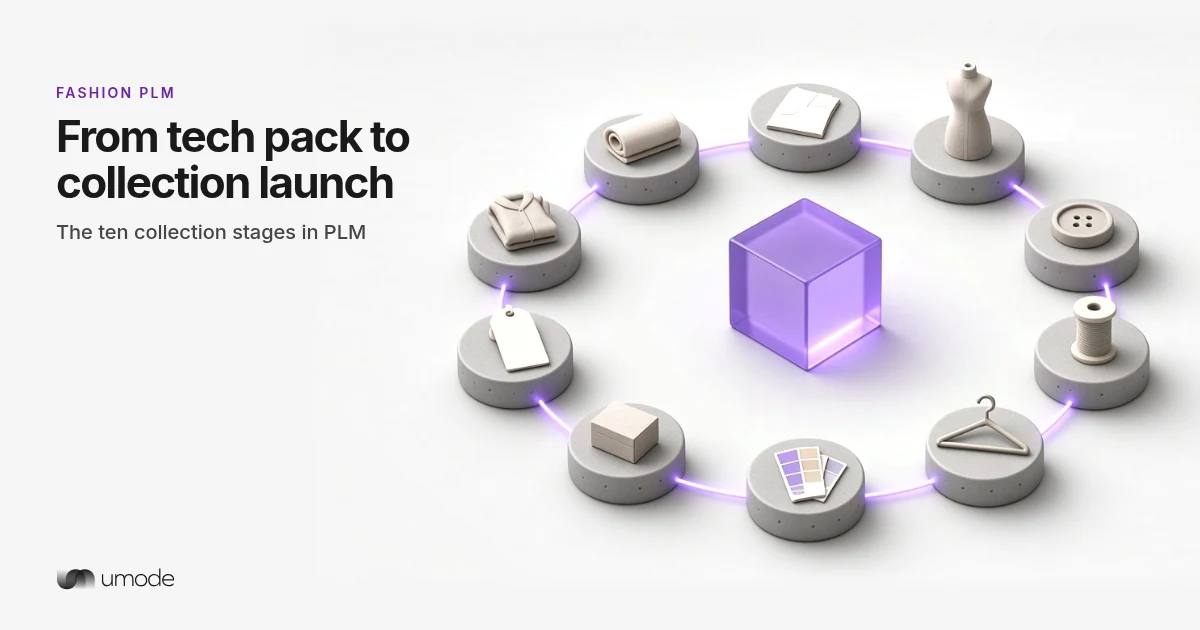
Fashion PLM, short for Product Lifecycle Management, is the system that keeps the collection in a single source of data.
In short:
- What it is: the system where the planned assortment, the tech pack, the supplier's response, the ERP lot and the ecommerce description all come from the same record.
- What it does not replace: the ERP, which invoices and controls inventory, and the judgment of the people who decide the collection.
- The center: the base tech pack, typed once and read by every area.
- Where to start: with the pain that costs the operation the most today, with no mandatory rollout order.
I write this guide as someone who has watched beautiful collections lose margin between one spreadsheet and the next. For me, PLM starts as a way of working, and the software comes in to support that way of working. In short boxes, I show how uMode's PLM handles each point.
What is fashion PLM, and what does it not replace?
Fashion PLM is where the product exists as data from before the purchase order until the garment is live. It organizes the work of design, merchandise planning, buying, product development, pattern making, suppliers and ecommerce around the same tech pack, with a history of who changed what and when.
In fashion, the cycle is short and jittery: the collection changes its mind before it becomes an order, the size run changes by channel and the supplier sends back a sample with adjustments. If you want the origin of the concept and why it gained ground in the industry, start with what PLM is and why it is in fashion and the entry on fashion PLM.
PLM does not replace the ERP. Invoicing, inventory, billing and tax stay there, as they should. PLM takes care of what happens before the product becomes a sales SKU: the negotiation between design, planning and buying, the tech pack that goes back and forth with the supplier, the approval of the physical sample.
It does not replace the designer's eye or the planner's judgment either. The system stores, cross-checks and alerts; people still decide the collection. I sum this up in one principle: AI Second, People First. Every brand has access to the same AI. What sets one brand apart from another is the context only it has, and PLM exists to keep that context, so that a person can leave and the intelligence stays. The Context Leader guide covers how a person builds and uses that context at work.
The problem: the collection is born in a spreadsheet and retyped
The problem PLM solves is retyping. The collection is born in a planning spreadsheet, becomes images in a reference folder, is typed again into the tech pack, again into the ERP and once more into the ecommerce product setup. Every handoff loses information, time and margin.

On the left, each area copies the data from the previous one; on the right, all of them read the same base tech pack. uMode diagram, 11/26/2026.
An illustrative scene, built to explain the pattern: the designer approves swapping a wooden button for a metal one in a chat with the supplier. The tech pack in the shared folder still has the old button. The buyer closes the order with the old tech pack, the ERP receives the old material and the website description mentions a wooden button. The garment arrives right, the product data arrives wrong, and someone spends the afternoon working out which file was the final one.
Each area worked with the information it had. The data lived in copies, and copies do not warn you when the original changes. The entry on tech pack version control shows the minimum you need even before any system.
PLM replaces the copy with a reference. There is one tech pack, and each area sees the part that concerns it. When the button changes, it changes for everyone, with a record of who changed it and why. The basics done well, which is what a collection operation needs most.
The ten collection stages in PLM
A collection goes through ten stages inside PLM, from the planned assortment to the decision recorded for next season. There is no mandatory rollout order: each module works on its own, and you can start with the stage that hurts most today.

Each stage reads from and writes to the same record, and the last one feeds the planning of the next collection. uMode diagram, 11/26/2026.
1. Plan the assortment from what sold
Planning the assortment means deciding how many products, from which groups, at which price points and for which stores the collection will have, starting from the actual results of previous collections. The entry on collection planning has the step-by-step method.
The common mistake. Copying last season's spreadsheet, applying a growth percentage and calling it a plan. The spreadsheet inherits the hits and the misses, and nobody separates one from the other.
How to do it well. Grade each product sold on sell-out (sales to the consumer) and sell-in (sales to the store) and ask what happened. An item that sold little because sizes ran out calls for replenishment; an item nobody wanted calls for a cut. Then build the assortment top-down, when the budget is fixed, or bottom-up, when you start from demand, and leave room for new styles.
How uMode's PLM handles it. In the Planejar (Plan) module, each product gets a grade from A to E on sell-out and sell-in, receives a diagnosis (Acertou, Falso positivo, Quebra de estoque, Produziu demais, Errou no produto: hit, false positive, stockout, overproduced, wrong product), reads seasonality and builds the assortment by group, price point, pyramid and store, spread by month. The planner reviews and decides.
2. Research and design with the brand's identity
Designing means turning references into product proposals that already respect the brand's identity. Research goes in, a card comes out, and the approved card already carries the data development will use.
The common mistake. Research scattered across screenshots, folders and chats, each designer analyzing references a different way, and design done in a tool that delivers images without data. When the image is approved, someone opens the tech pack and retypes everything.
How to do it well. Write down what the brand is, including what it never does, and gather references in one place, with the same analysis criteria. Treat the fashion moodboard as a starting point that turns into a proposal, and make approval generate data, with product type, group and color already filled in.
How uMode's PLM handles it. In the Criar (Create) module, the Perfil de Marca (Brand Profile) keeps the identity in versions and guides image generation, with modes such as photorealistic, technical flat, apply to model, color variants and create a family. The Coletor de Referências (Reference Collector) gathers what the team finds, the Área de Pesquisa (Research Area) organizes the analysis, and design can also start from the designer's hand sketch. The card is data: once approved, it is born in the Desenvolver (Develop) module with its image and information. See the design board (page in Portuguese).
3. Give the product a tech pack
A product without a tech pack is just a nice drawing. Giving the product a tech pack means gathering in one record everything that defines the garment: sketch, measurements, size run, materials, finishing processes, color variants and supplier. The entry on the tech pack has a filled-in template, and the text on the living tech pack in PLM shows what changes when it stops being a file.
The common mistake. The tech pack lives in a spreadsheet attached to emails. The size chart is graded by hand, size by size, and material consumption is calculated for one color and copied to the others. Any adjustment after the fitting turns into a round of "which version is the right one".
How to do it well. Set a base size and grade from it, in centimeters or percentages, so that a change to the base propagates. Tie material consumption to each variant and each size. Keep history per field: who changed the shoulder measurement and when. The size run comes in here as tech pack data, and the text on size charts and size runs in PLM goes deeper.
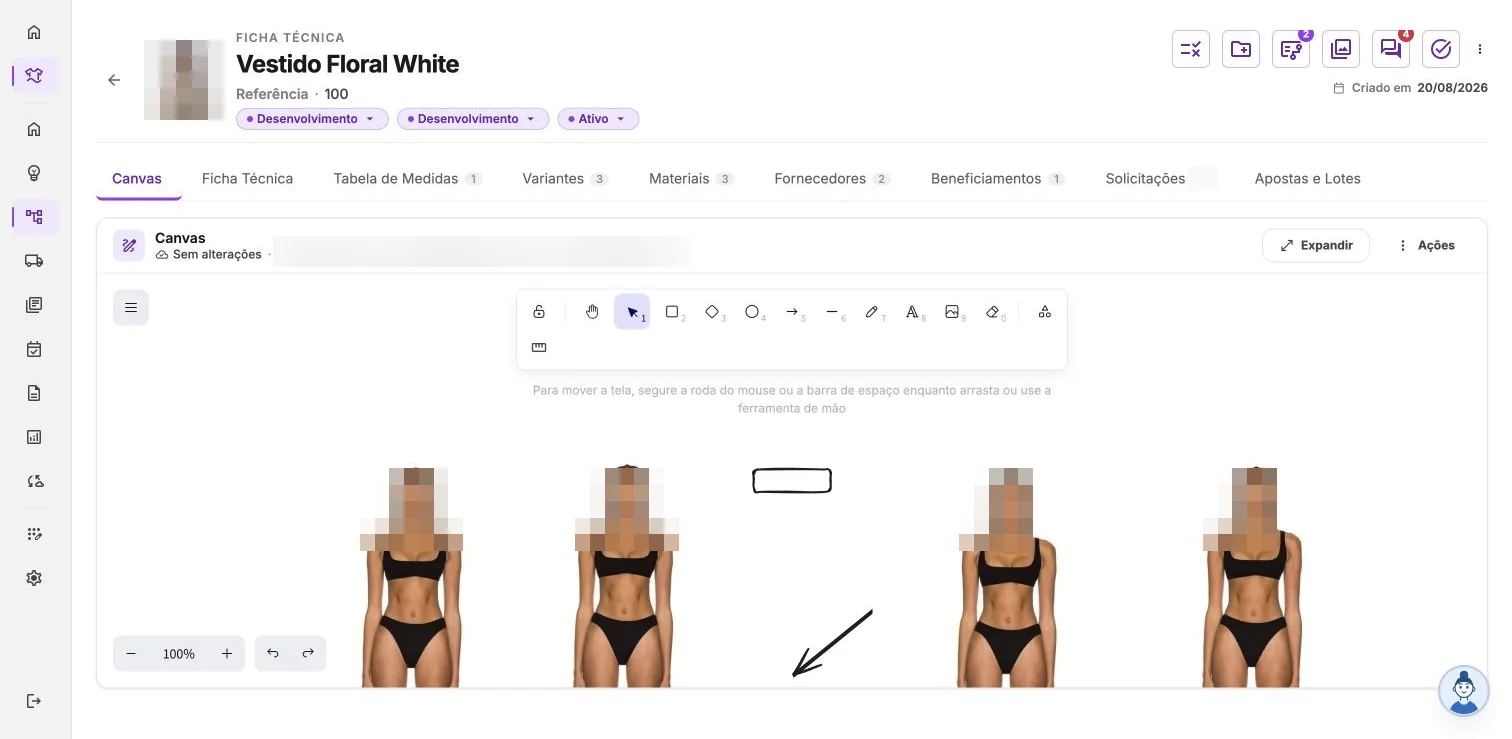
The canvas sits inside the tech pack, and every version of the sketch can be restored. Screenshot of uMode's PLM, demo account, 11/12/2026.
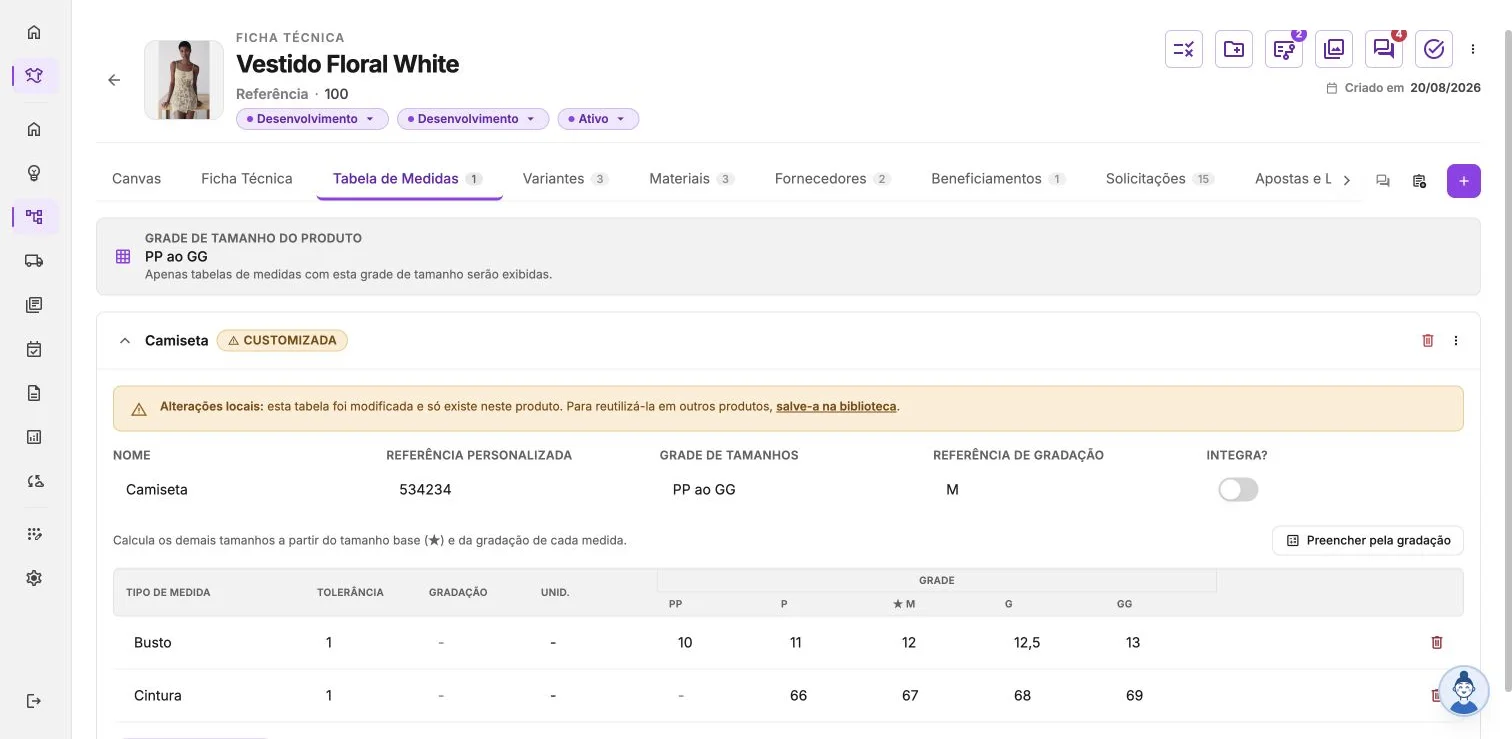
Grading starts from the base size and propagates across the size run. Screenshot of uMode's PLM, demo account, 11/12/2026.
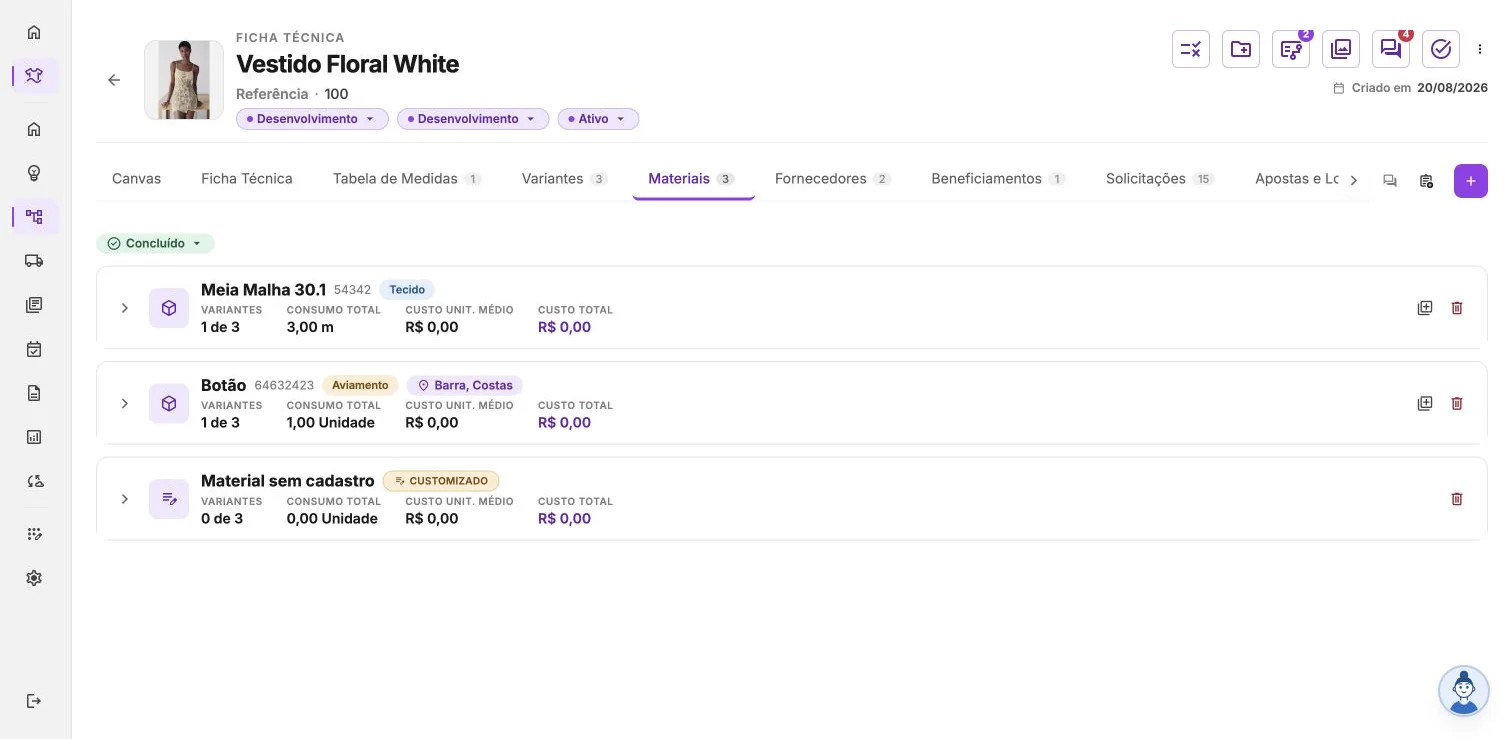
Each material's consumption is tied to the variant and the size, with no copying between colors. Screenshot of uMode's PLM, demo account, 11/12/2026.
How uMode's PLM handles it. In the Desenvolver (Develop) module, the tech pack has the tabs the brand itself defined, shows who is editing at the same time, keeps history per field and allows bulk editing and a spreadsheet mode for anyone who prefers working in rows. AI helps translate the tech pack and suggest pattern adjustments, always as a proposal. See tech pack and development (page in Portuguese).
4. Let the supplier fill in the tech pack
Letting the supplier fill in the tech pack means giving them access to the part of it that concerns them, so they answer inside the system instead of sending a spreadsheet. The text on how the supplier fills in the tech pack in PLM details the flow.
The common mistake. The supplier gets the tech pack by email, sends back a spreadsheet with price, consumption and lead time, and someone at the brand retypes it. The history lives in one person's inbox.
How to do it well. Decide, field by field, what the supplier can see and what they can edit. Open requests with a type, a deadline and a checklist: fabric swatch, embroidery, print, lab dip, sales sample, photo sample, pilot. Require the answer to come in the right field and be recorded with the name of whoever answered.
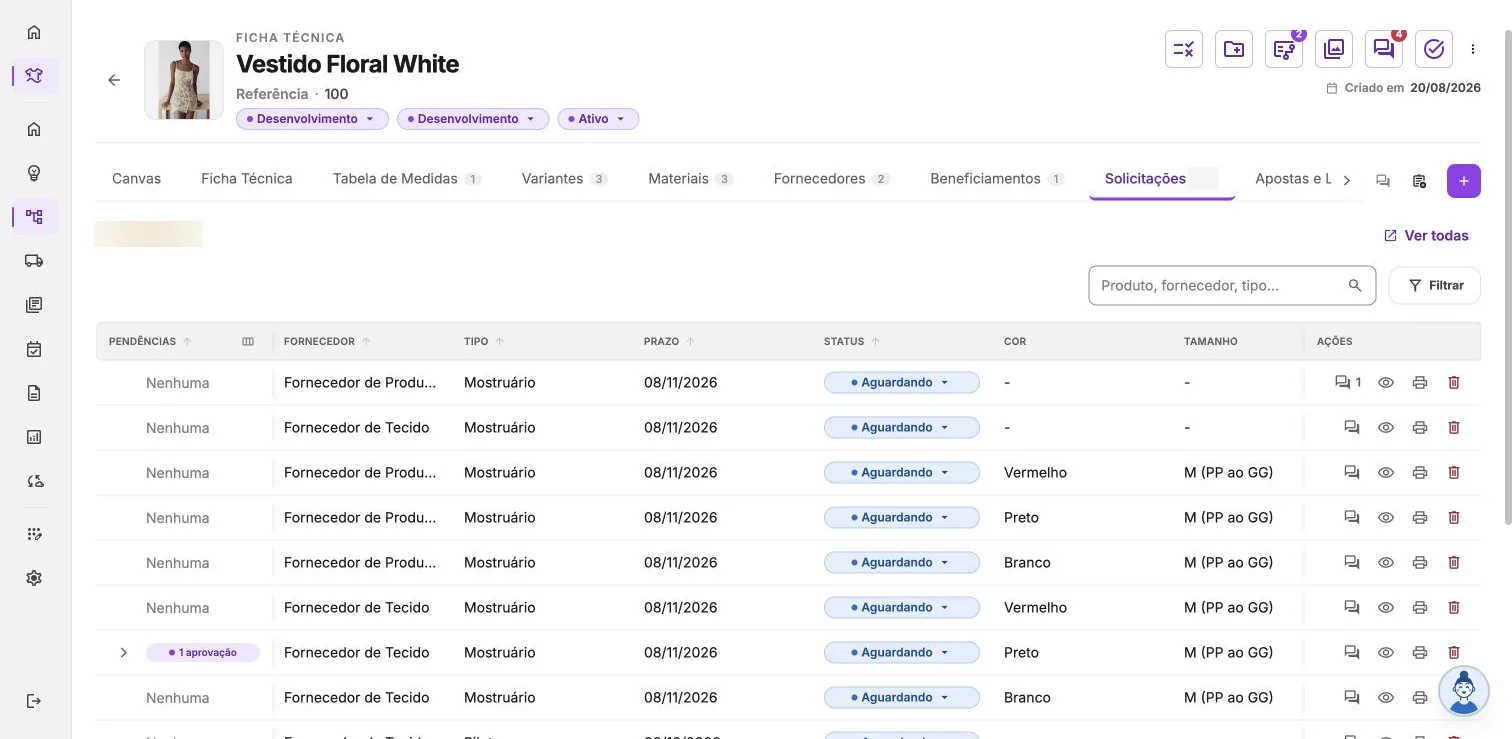
Requests live inside the product's tech pack, with a deadline and a status. Screenshot of uMode's PLM, demo account, 11/12/2026.
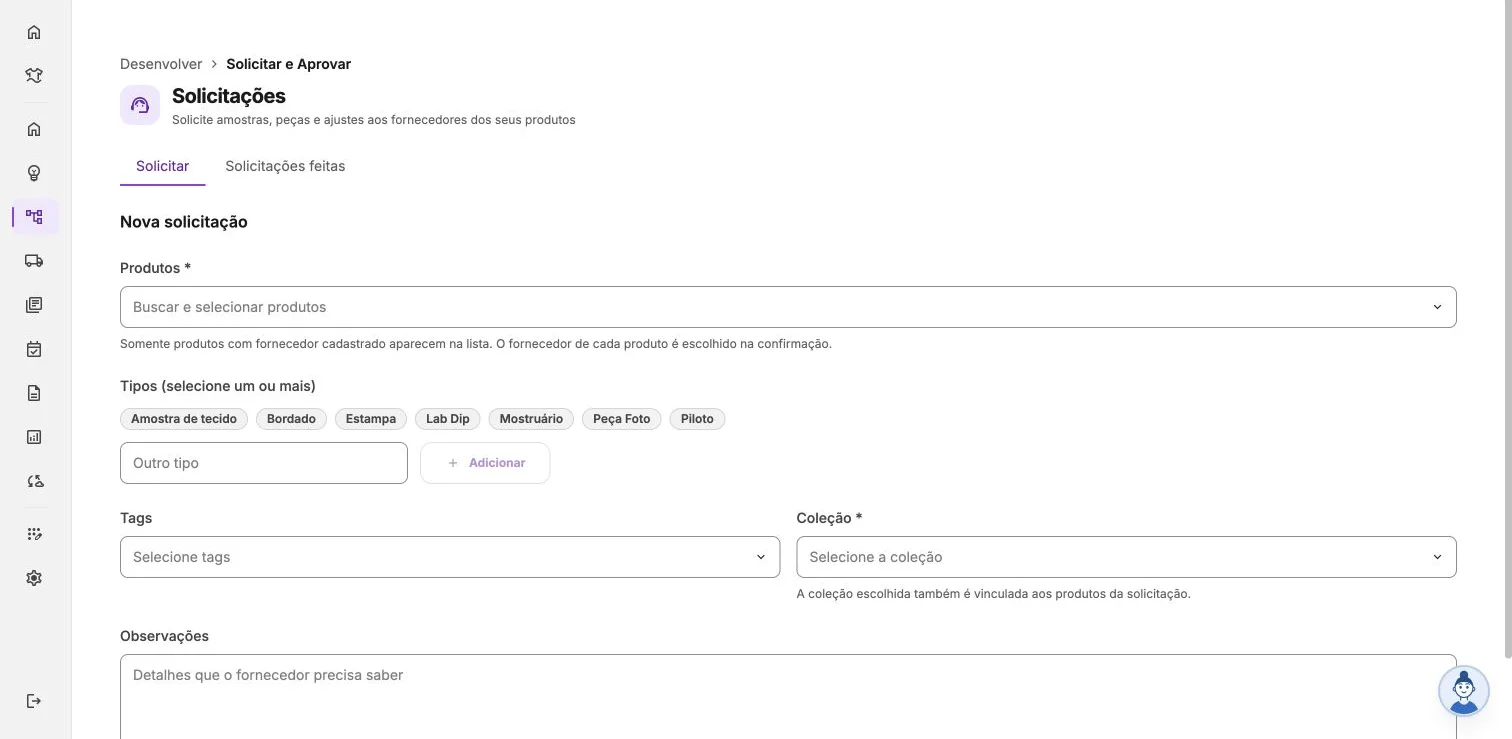
Each request type carries its own checklist. Screenshot of uMode's PLM, demo account, 11/12/2026.
How uMode's PLM handles it. In the Fornecedor (Supplier) module, each tech pack field has Visible and Editable switches for the supplier, and the history records "Supplier" together with the actual user who made the change. A supplier who serves several brands chooses which account to work in, and isolation between brands is enforced on the server.
5. Approve the physical sample with a checklist and move the workflow
Approving the physical sample means checking it against the tech pack, recording the verdict and releasing the next stage only when the requirements are met.
The common mistake. Approval happens in chat messages and voice notes. The fitting verdict lives in the memory of whoever was in the room, and the product's stage changes because someone remembered to change it.
How to do it well. Write the checklist for each type of approval. Define what the product needs to enter and leave each stage, with a deadline per stage. Make delays show up on their own, counted in days. Use automations for what is repetitive: open a task, request an approval, recalculate a field, notify someone. Lock editing of what has been approved and require a reason to unlock it.
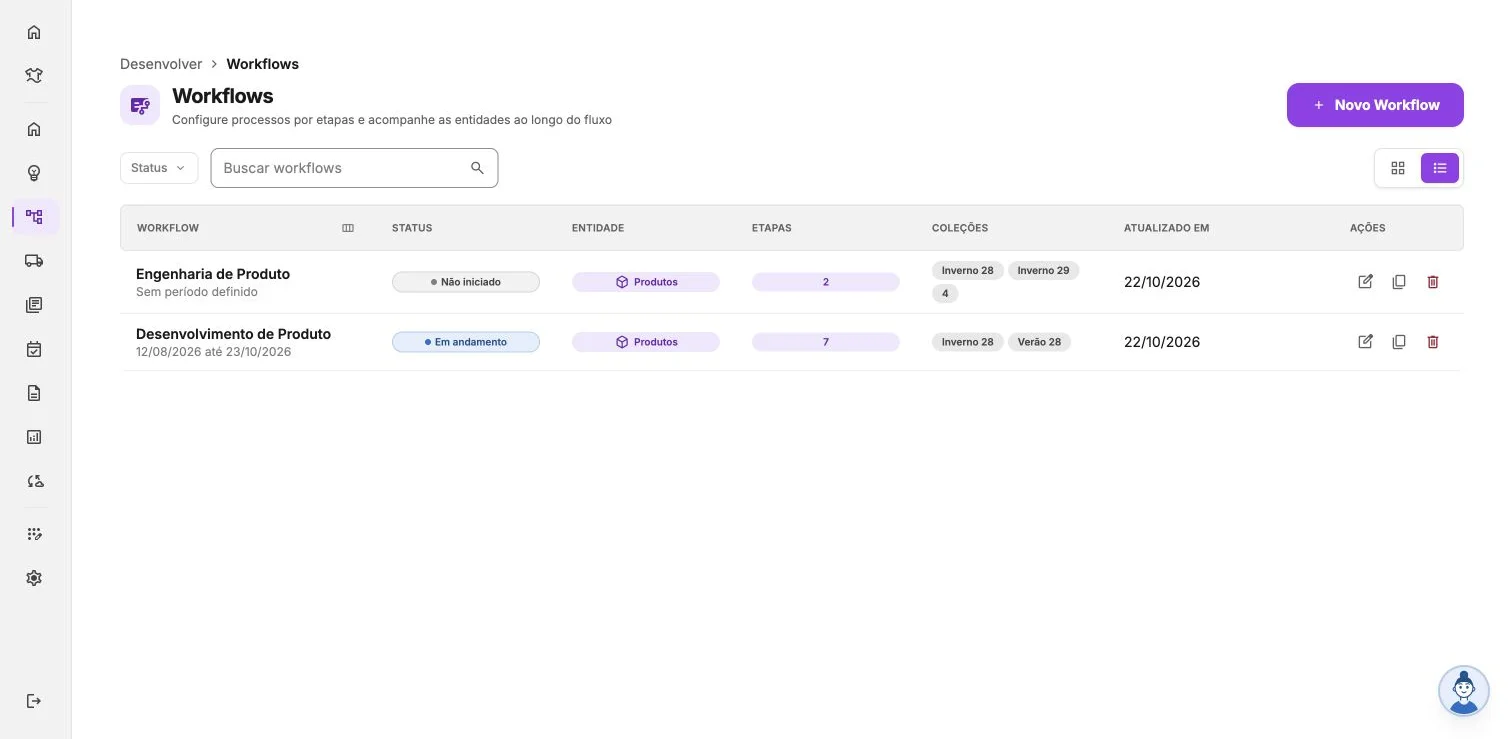
Each workflow defines the stages the product goes through and which collections it applies to. Screenshot of uMode's PLM, demo account, 11/12/2026.
How uMode's PLM handles it. Workflows and automations live in Configurações (Settings). The workflow shows up as a pipeline, a kanban board, a timeline and an automation map, with entry and exit requirements, a deadline per stage and delay alerts. An automation triggers a task, an approval, a calculation, an email or a message, and it can be tested on a real product before it goes live. In sample approval, AI transcribes the voice note with the verdict into the tech pack.
6. Place the buy and close the lot within budget
Placing the buy means deciding how many units of each variant, in each size and for each channel, before closing the production lot. The lot is the order that comes out of that buy, and OTB (open to buy) is the purchasing budget that caps it all.
The common mistake. Buying and planning fight over volume in a spreadsheet only one of them can edit. The OTB blows up and someone finds out at month end.
How to do it well. Buy by size and by channel: retail, wholesale, ecommerce, sales samples and photo samples have different needs. Allow reorders (a new release of a product that sold) and partial lots without losing the link to the buy. When the buy changes, require a reason and show planned against actual. Build the OTB by collection, channel and month, with a markup target, and make a lot that exceeds the budget stop before it becomes an order.
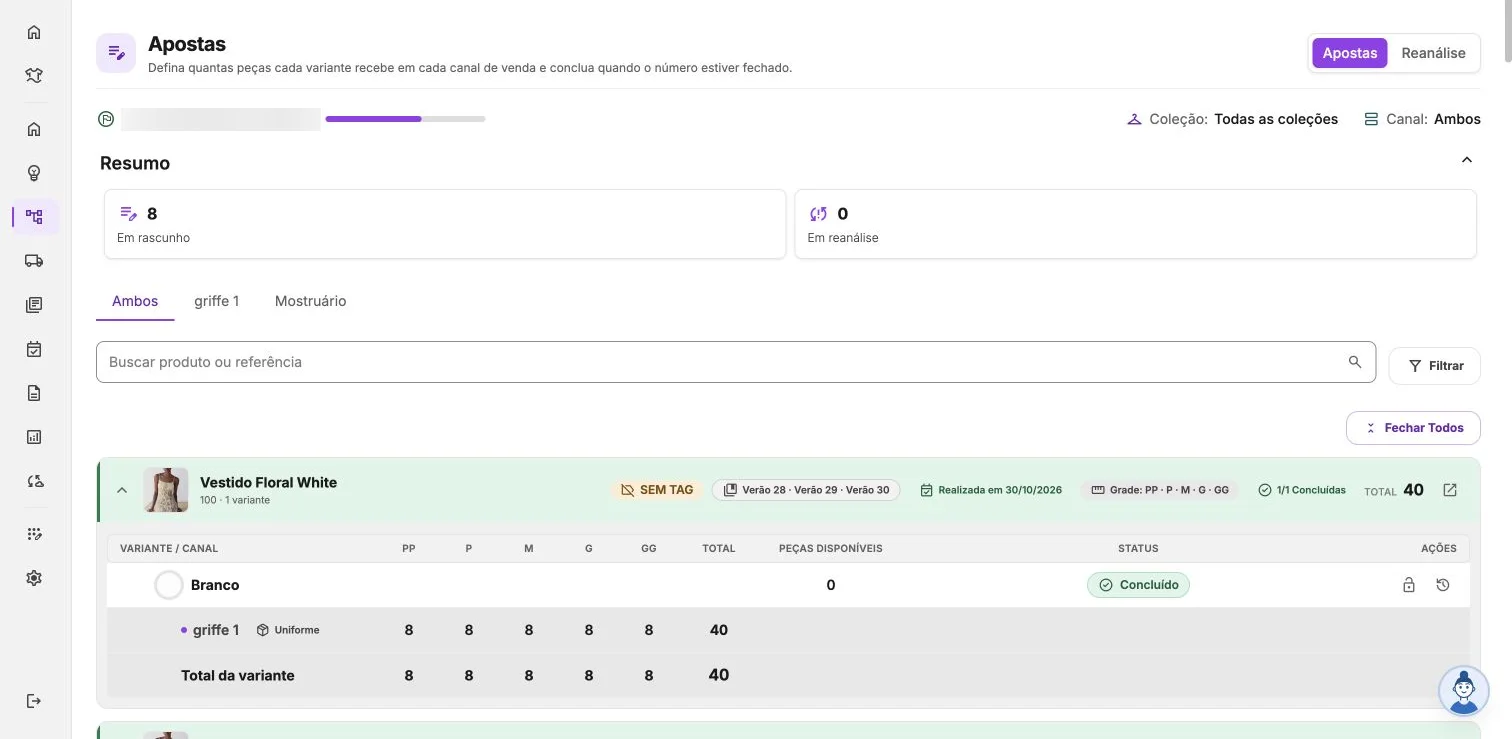
The buy is placed by variant and by channel, with an audit trail of every change. Screenshot of uMode's PLM, demo account, 11/12/2026.
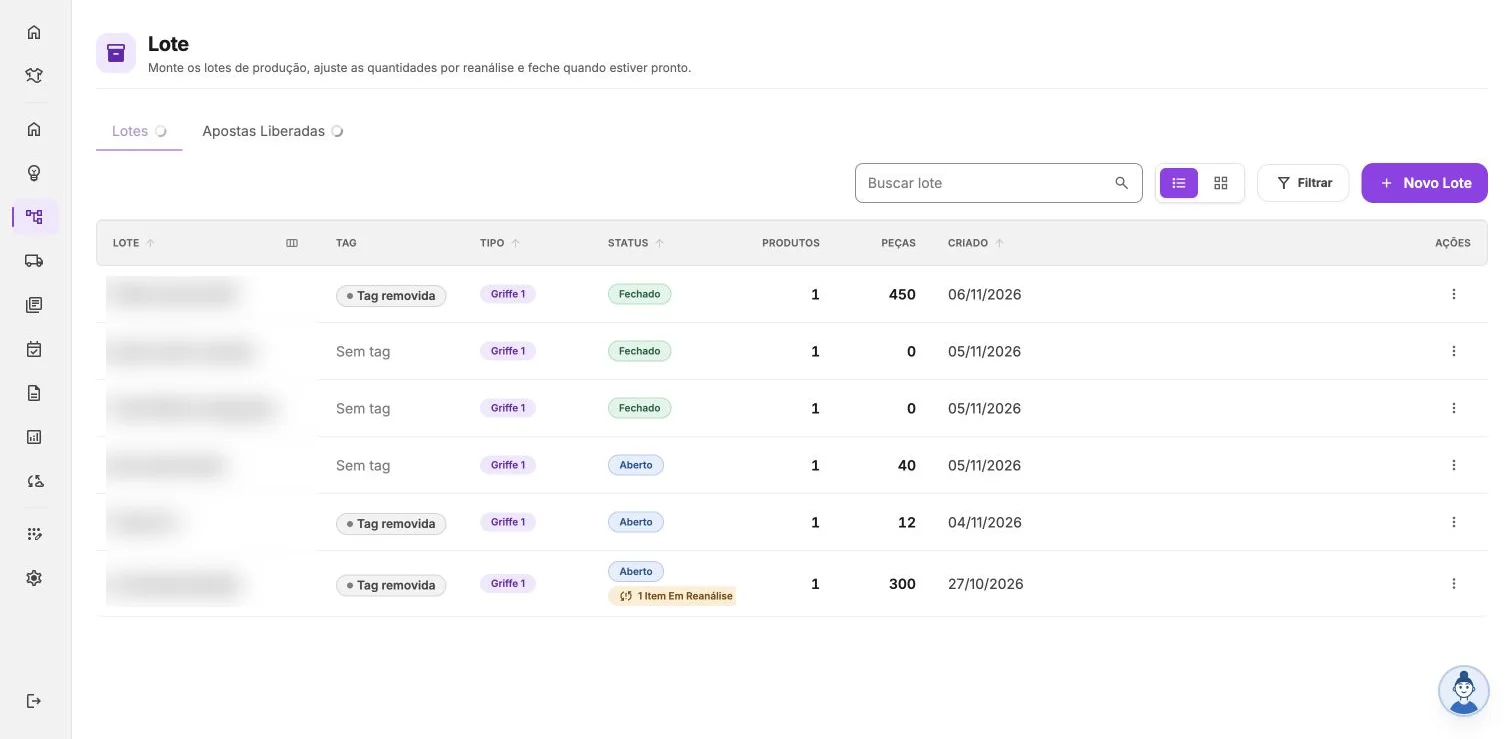
The lot comes from the released buy and keeps its link to it. Screenshot of uMode's PLM, demo account, 11/12/2026.
How uMode's PLM handles it. Aposta e Lote e OTB (Buy, Lot and OTB) works without AI: the calculation is deterministic and auditable. It accepts unlimited reorders, partial lots, Matar Saldo (close out the balance) and Reanálise (re-review) with a reason. The OTB plan has versions, a green, amber and red signal, and a Cofre (Vault): a lot that exceeds the budget only saves with a request to the Cofre, approved at another level. See collection and assortment (page in Portuguese).
7. Send the lot and the tech pack to the ERP
An approved tech pack that someone copies by hand into the ERP turns back into a spreadsheet. Sending to the ERP means getting the approved product and the closed lot into the management system with the same data that was decided in PLM, without retyping.
The common mistake. Integration treated as an IT project every time something changes, with the product team waiting in line. Meanwhile, someone copies the tech pack by hand.
How to do it well. Define which fields PLM reads from the ERP and which it writes to it. Test in a staging environment before switching on in production. Require error messages in language the product team understands. Block any variant that does not yet exist in the ERP, so it cannot become a lot without existing on the other side.
How uMode's PLM handles it. In the Integração (Integration) module, reading and writing are configured without code, by clicking on a real sample of the ERP's response, and tested before saving. The sending routine is written in plain language, errors come from an explained catalog and the history keeps what went out and what came back. There is a production environment and a staging environment.
8. Write the ecommerce catalog
Writing the catalog means turning the tech pack and the photos into the sales description, the attributes and the image alt text the ecommerce site publishes.
The common mistake. The product code is ready and waits for a description. When it comes, it was written by looking at the photo, and it says cotton where the tech pack says polyester.
How to do it well. Generate the text from the tech pack data, which counts for more than an impression from the photo. Tune the tone to the brand voice, keep a person validating before publishing and send the validated text back to PLM.
How uMode's PLM handles it. Vendas, Enriquecer (Sales, Enrich) generates the ecommerce description, the internal description, the SEO copy, the image alt text and the attributes from the tech pack and the photos, tuned to the brand's DNA. Validation by a person is mandatory, the product data counts for more than what AI sees in the photo, and each correction becomes an instruction.
9. Track deadlines and results
Tracking means knowing, at any moment, which stage each product is in, what is late and how the collection is performing. The entry on the collection calendar explains how to build the schedule, and the text on the collection calendar in PLM shows how it updates from the system's own data.
The common mistake. The schedule is a spreadsheet updated when someone remembers, and the assortment meeting decides in favor of whoever talks loudest.
How to do it well. Organize the schedule by collection, stage and substage, and make progress come from what actually happened to the products. Use reports that read the same data as the tech pack. When the collection is decided as a group, replace open debate with voting in rounds, with criteria and comments, and keep the ranking as the record of the decision.
How uMode's PLM handles it. The Cronograma (Calendar) has performance and table views, and a stage can update from a report. Relatórios (Reports) also accept the brand's own BI. Votação (Voting) runs in rounds, in classic, random and group modes, with a comment per vote, a ranking and voting by link for people without system access.
10. Keep the reason behind each decision
Keeping the reason means recording, next to each relevant decision, the rationale and the source behind it, so the next collection starts where this one left off.
The common mistake. The reason for each choice lives in the head of whoever decided. When that person leaves, the brand repeats the mistake or drops a winner without knowing it.
How to do it well. Tie the decision to the data that drove it: the product's grade, the voting result, the fitting verdict. Let agents handle preparation, follow-up and reporting tasks, but make everything that goes outside the company pass through a person's approval.
How uMode's PLM handles it. The BrainHub is the company's memory, with the source of each decision, and it has agents that prepare, follow up and report. Nothing is sent without a person's sign-off, given in an approval queue. What the AIs learn from each person stays with the company when that person leaves.
The base tech pack as the center of PLM
The base tech pack is the center of PLM: it defines what the team sees in development, what the supplier sees, what goes to the ERP and what reports add up. The field defined in the base tech pack is the same one the supplier sees, that goes to the ERP and that reports add up.

The base tech pack defines what each area sees, and every area reads the same field. uMode diagram, 11/26/2026.
When each area has its own records, each area has its own truth. When all of them read from the same base tech pack, the conversation shifts from "which spreadsheet is right" to "what does the tech pack say". The text on the configurable base tech pack shows how this structure grows out of the collection plan.
The base tech pack is fed by two layers of master data. Bibliotecas (Libraries) hold the items the tech pack uses: colors, suppliers, taxonomy, materials, compositions, tax codes, size runs, size charts with tolerances and finishing processes. Cadastro de Apoio (Support Records) holds the rules: selection fields, labels, life cycles, packages, request types and their checklists, validations that raise an error or a warning, and fixed costs. In short: the Libraries say what; the Support Records say how.
Think of navy blue written several different ways in different tech packs. With the color entered once in the library, with a name, hex value, RGB and a reference color code, the tech pack picks from the list and the report by color adds up correctly.
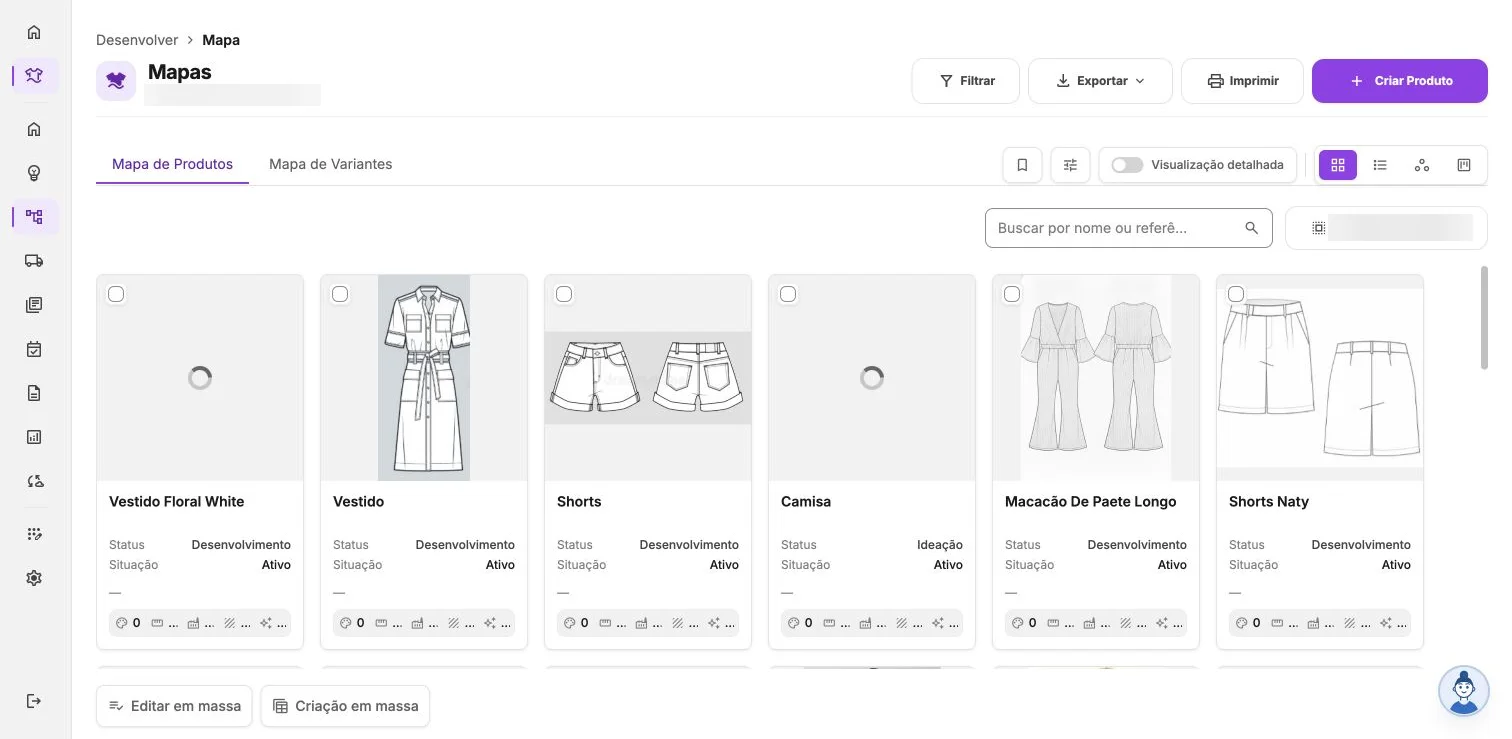
Every product of the brand starts from the same base tech pack and appears on the same map. Screenshot of uMode's PLM, demo account, 11/12/2026.
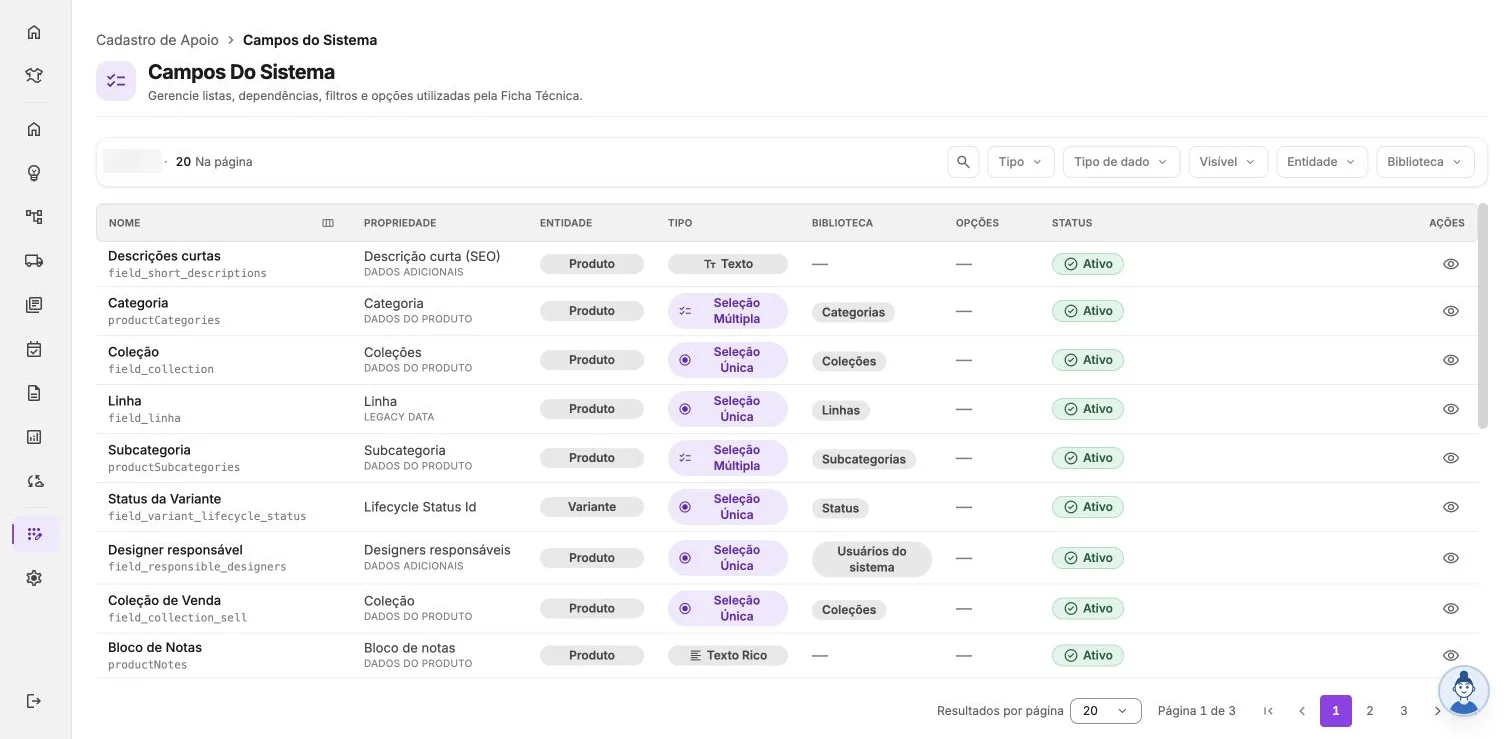
Each base tech pack field has a type, a visibility setting and a link to the library it comes from. Screenshot of uMode's PLM, demo account, 11/12/2026.
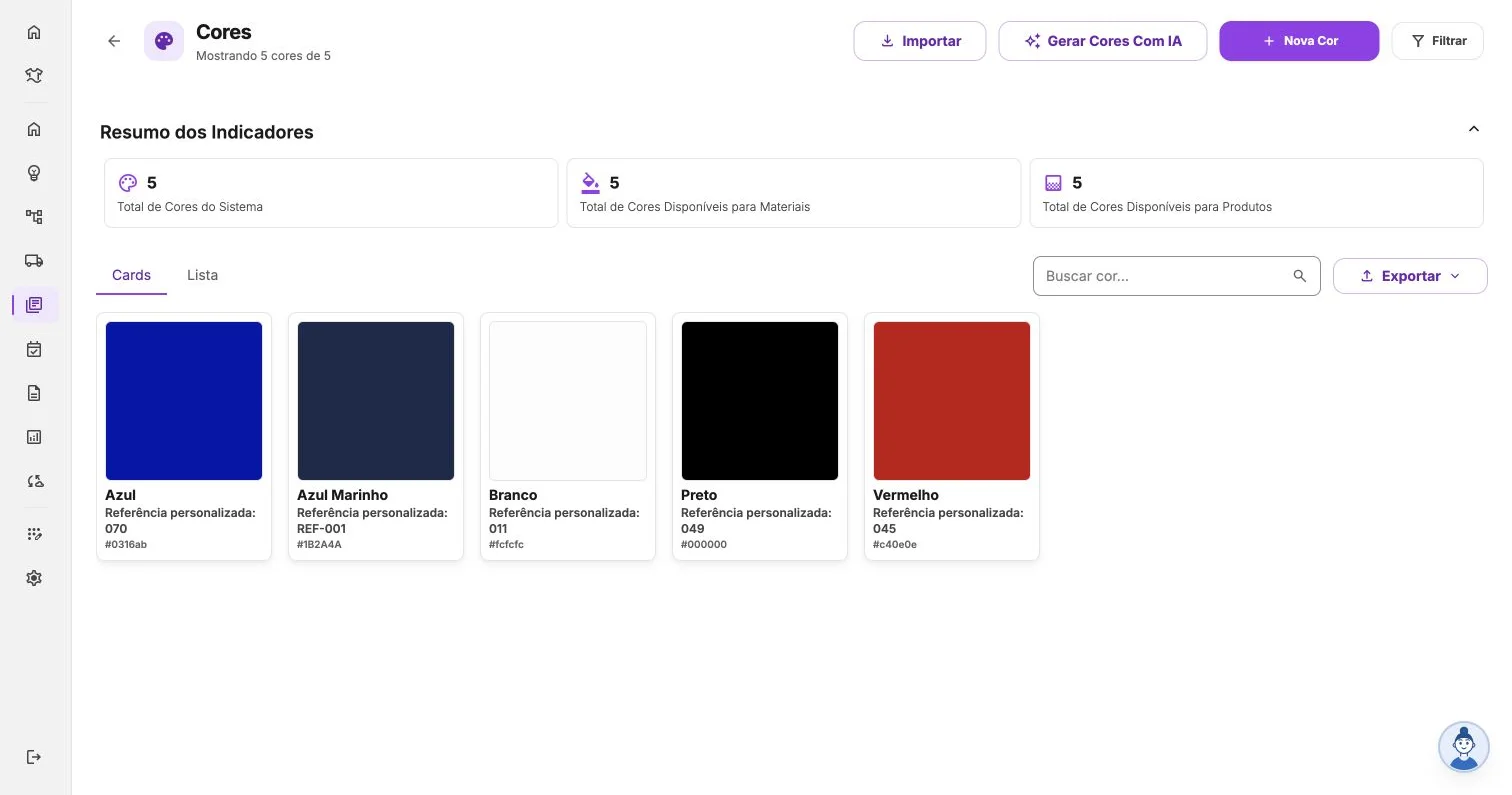
A color is entered once and used by every tech pack. Screenshot of uMode's PLM, demo account, 11/12/2026.
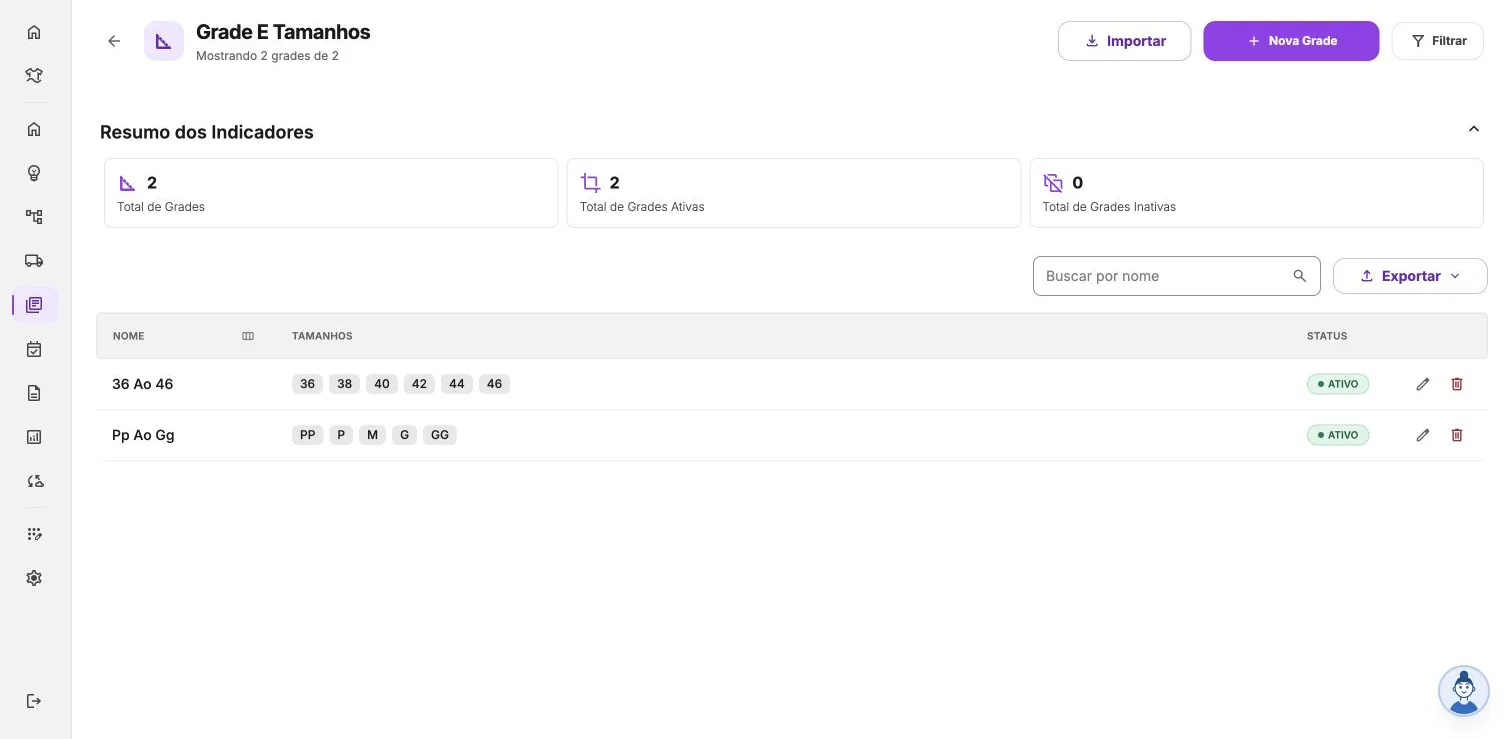
The size run entered in the library is the same one the tech pack and the buy use. Screenshot of uMode's PLM, demo account, 11/12/2026.
How uMode's PLM handles it. Bibliotecas and Cadastro de Apoio hold the items and the rules, and the Construtor de Fichas Base (Base Tech Pack Builder), in Configurações (Settings), assembles the tech pack. The brand itself defines the field types, the rules to show, hide, make read-only or require, and the conditional locks. Items that come from the ERP are protected in the library, and AI can generate the hex value from the color name.
Who uses PLM in a fashion brand?
PLM is used by every area that touches the product before the sale, each with its own screen and permissions. In my reading, a system only leadership opens becomes an expensive report, and one only design opens becomes an image folder. It has to serve whoever does the typing.
Leadership. Follows the collection through the calendar, the OTB signal and the reports, and approves the lot that exceeds the budget.
Design. Researches, designs and approves proposals with the brand's identity on record. The approved card becomes a tech pack with no retyping.
Planning and buying. Builds the assortment from what sold, places the buy by variant, size and channel, closes lots and controls the budget. Both sides look at the same number.
Product development and pattern making. Looks after the tech pack, the size chart, grading, materials and supplier requests.
Ecommerce. Receives the description, attributes and alt text generated from the tech pack, validates and publishes.
IT. Configures the ERP integration, manages access profiles and follows the sending history. It stops being a queue for every process change.
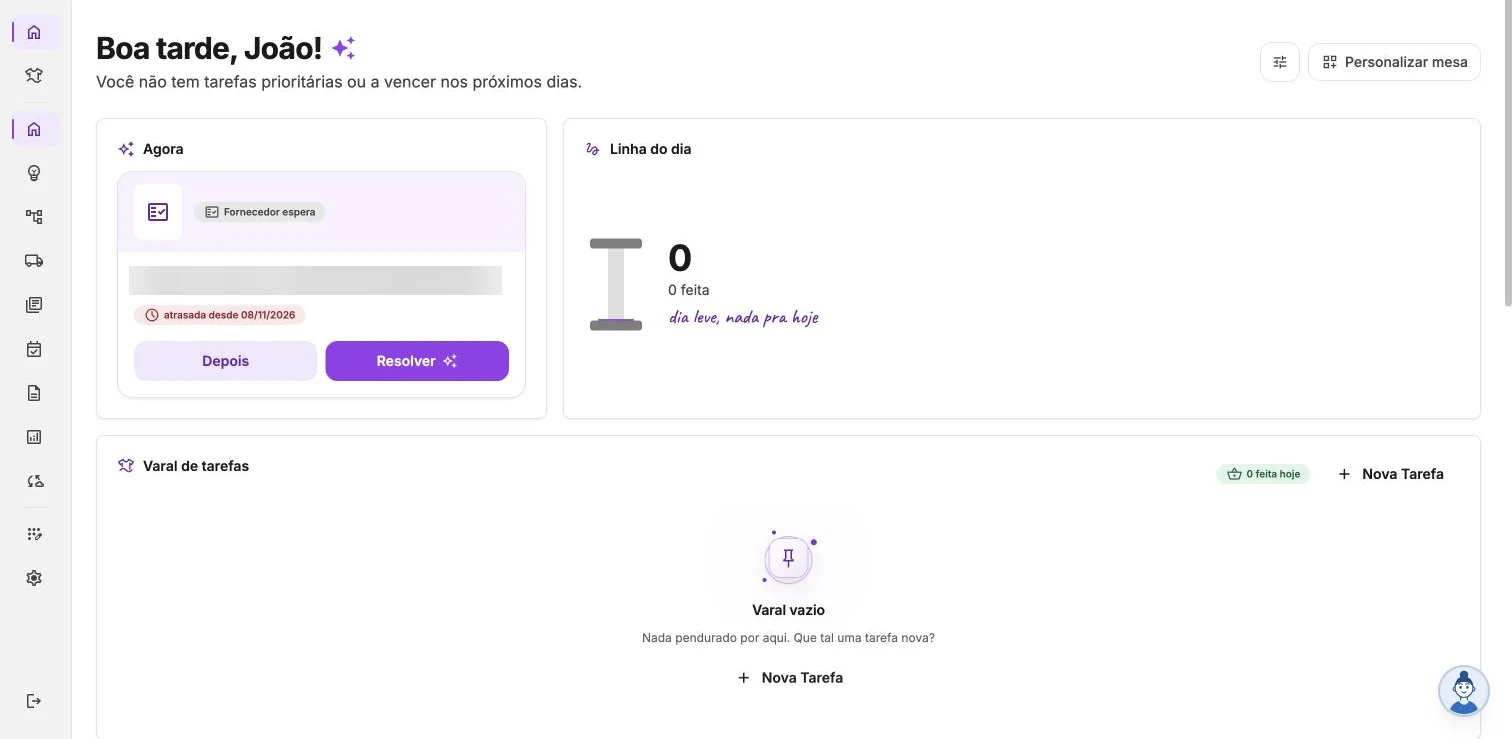
Minha Mesa (My Desk) shows each person what to do now, their calendar and the day's tasks. Screenshot of uMode's PLM, demo account, 11/12/2026.
How uMode's PLM handles it. Minha Mesa (My Desk) is each person's home screen, set up by profile (creative, buyer, manager), with the most urgent item highlighted, pending approvals and the calendar.
What is the difference between PLM, spreadsheets, design tools, ERP and generic AI?
Each tool does one part of the collection work well, and the trouble starts when one of them tries to do another's job. The table below compares what each one does well and where it falls short.
| Tool | What it does well | Where it falls short in the collection |
|---|---|---|
| Spreadsheet | Flexible, everyone knows how to use it and nobody else is needed to change it | No per-field history or locks, and it creates parallel versions of the same tech pack |
| Design tool | Gives design visual freedom | Delivers images without data, which someone later retypes into the tech pack |
| Traditional PLM | Strong tech pack and version control | Configuration and rollout usually depend on the software vendor, and the brand's suppliers are left out |
| ERP | Invoices, controls inventory and handles tax | Not built for the negotiation between design, planning and buying before the order exists |
| Generic AI | Helps with isolated text and images | Does not know the brand, starts from scratch in every conversation and keeps what it learns in each user's personal account |
| PLM with a single source of data | Connects the stages through the same base tech pack, with history and role-based permissions | Requires the brand to organize its master data and own the process |
The spreadsheet is usually every brand's first system, and it deserves respect. The text on PLM vs spreadsheet helps you recognize the moment it stops coping. The confusion between ERP and PLM is also common, and the entry on the differences between ERP, PLM and PIM separates the role of each. If you have heard of PDM and are not sure where it fits, read the difference between PDM and PLM.
A good PLM speaks the language of fashion: buys, reorders, sales samples, photo samples, closing out balances, lab dips, grading. When the system forces the team to translate its work into another industry's vocabulary, the team goes back to the spreadsheet. The board on the wall becomes a canvas, the approval table becomes an approval card and the planner's spreadsheet becomes spreadsheet mode, and the way of working stays recognizable.
How does AI work inside a PLM?
In PLM, AI prepares, organizes and remembers; the person decides and approves. Most of the workflow runs without AI, if the company prefers it that way.
I see wrong expectations in both directions: some people imagine AI putting the collection together on its own, and others fear decisions nobody saw. In a well-designed PLM, neither happens. AI shows up where it saves repetitive work or widens the analysis, and every output it produces is a proposal someone reviews.
Some parts of the workflow run without AI on purpose. The buy, lot and purchasing budget calculation should be deterministic and auditable: when deciding volume and spend, predictability is worth more than creativity. Supplier records, integration, the calendar and voting can also run on rules and configuration alone.
Whoever is responsible for the stage approves what AI suggests. The sales description only goes to ecommerce after someone on the team validates it. A generated image only becomes a product when the card is approved. Any agent action with an effect outside the system, such as sending a message or changing data somewhere else, becomes an approval request in the queue.
How uMode's PLM handles it. The AIs work with the brand's context, kept in the Perfil de Marca, the tech pack and the BrainHub, and what the team approves becomes company learning. Aposta e Lote e OTB works without AI, with deterministic, auditable calculation; Fornecedor, Integração, Cronograma and Votação do not use AI. The company chooses where to switch AI on, and most of the workflow runs without it, if the company prefers.
How does a fashion PLM protect data?
A secure fashion PLM follows four principles: each brand isolated, each supplier restricted to what is theirs, access by role and every change recorded. When a permission is in doubt, the system denies it.

Each layer restricts the previous one, and when in doubt access is denied. uMode diagram, 11/26/2026.
Isolated brand. One brand's data never shows up for another, even when both work with the same supplier. This isolation is enforced on the server.
Supplier limited to what is theirs. The supplier sees only their own products and only the fields the brand has opened. What they edit is signed with the name of whoever edited it.
Access by role. Each person has a role, and each role has permissions per module.
History per field. Every change is recorded with who made it, when and the previous value. In the buy and the lot, a relevant change requires a reason.
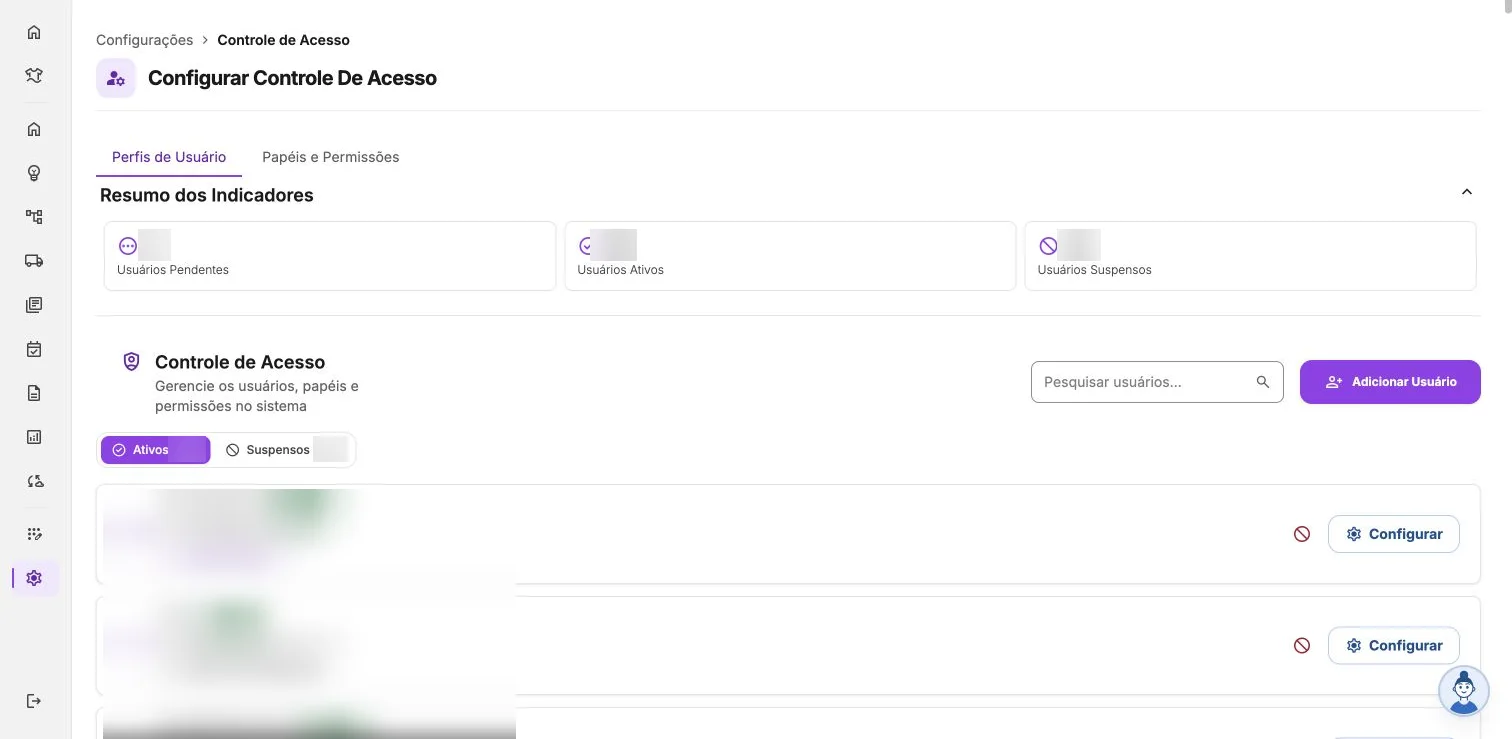
Permissions are defined by role and by module. Screenshot of uMode's PLM, demo account, 11/12/2026.
One sentence sums up the design: the interface guides, the server enforces. The screen hides the button you cannot use, and the server is what blocks the action. I insist on this point because a hidden button can be worked around with a little curiosity; a rule on the server applies to every path that reaches the data.
How uMode's PLM handles it. Access control lives in Configurações (Settings). Access goes through three layers, the contracted service, the role's permission and the separation between the customer's environment and uMode's, and when in doubt the system denies. AI actions with an external effect become approval requests.
How do you start implementing a PLM?
The right way to start a PLM is with the pain that costs the most today. The modules work independently, and there is no mandatory rollout order.
Do not chase trends while you have a backlog. Check, in the list below, the pains that keep repeating in your operation and see where to start.
- Collection planning lives in a spreadsheet and repeats last season: start with assortment planning.
- Research is scattered across screenshots, folders and chats: start with research and design.
- The tech pack lives in spreadsheets and email: start with the tech pack.
- Sample approval happens in messages and voice notes: start with requests and approvals.
- Every process change becomes a ticket to the software vendor: start with workflow configuration.
- The supplier sends everything by spreadsheet: start with supplier access to the tech pack.
- Buying and planning fight over volume, or the OTB blows up late: start with the buy, the lot and the budget.
- ERP integration always turns into a project: start with the integration.
- The calendar is always out of date: start with a calendar tied to the products.
- The assortment is decided in meetings with no record: start with voting.
- The product code waits for a description before going live: start with the ecommerce catalog.
- Knowledge lives in people's heads: start with the decision memory.
A few signs show a brand is ready for PLM: recurring collections, a pain the team can name, an ERP already chosen and an organized sales history. Without a named pain, the rollout becomes a wish list. The entry on implementing PLM for fashion details the phases and what to watch in each.
How uMode's PLM handles it. The first step with uMode is an initial diagnosis: understanding the operation, the pain and the ERP, and recommending which module to start with. The cost depends on the modules chosen, which is why the diagnosis comes before any proposal. Find out how to get to know uMode's PLM (page in Portuguese).
Frequently asked questions
What is the difference between PLM and ERP in fashion?
PLM looks after the product before it becomes a sales SKU; the ERP invoices, controls inventory and handles tax. PLM hands the ERP the tech pack and the lot already decided.
How much does a fashion PLM cost?
It depends on the modules and the scope, which is why the first step is a diagnosis. It shows the pain, the ERP and which part of the workflow is worth starting with.
Do I need an ERP in place before implementing a PLM?
It helps a lot. PLM exchanges data with the ERP, and knowing which system receives the lot and the tech pack guides the integration. Without an ERP in place, you can start with modules that do not depend on it, such as design, tech pack and supplier, and integrate later.
Does PLM cover the industrial side, such as production scheduling, bill of materials and costing?
It covers the part that starts in the tech pack: materials and consumption by variant and size, finishing processes and pre-costing. Production scheduling and accounting cost stay in the ERP, which receives the product and lot data from PLM.
Who approves what AI suggests inside PLM?
The person responsible for the stage. AI prepares, organizes and remembers; the description is only published after validation, an image only becomes a product once the card is approved, and any action with an external effect goes into an approval queue.
Is the brand's data protected and kept separate from other companies?
Yes. Each brand is isolated on the server, even when it shares a supplier with others. The section above on how PLM protects data details the four layers.
How does PLM keep a change in one stage from breaking the next ones?
With a single base tech pack, locks and stage requirements. Every area reads the same tech pack, anything already approved only unlocks with a reason, and the product only moves forward when it meets what the stage requires.
Our planning and reconciliation process is still manual. Where do I start?
Start with the pain that costs the most. If the problem is the assortment, start with planning from what sold; if it is volume and budget, start with the buy and the OTB. An initial diagnosis helps you choose.
Doesn't opening the tech pack to suppliers expose the brand's data?
Not if access is well designed. The supplier sees only their own products and only the fields the brand has opened, field by field. Every edit is signed with the name of whoever made it.
Won't a PLM make our process rigid?
Only if configuration depends on the software vendor. When the team itself configures tech packs, workflows and automations, the process changes along with the brand. Reorders and partial lots also need to work as system rules.
Sources and further reading
- PLM: Product Lifecycle Management in fashion, how it works
- Placing the size buy by color and channel
- PLM and ERP integration without retyping
- Product assortment in fashion
- PIM for fashion
- How to plan a collection launch calendar
- Context Leader (HIC): what it is, the six steps of the track and how to develop one
- AI maturity in fashion companies: from Steam to Frontier, measured by area
- The new AI org chart: the layered structure behind people, agents and areas
- Steam engine and AI: without redesigning the work, the tool does not change the outcome
When the button changes in the tech pack, it has to change for the supplier, the ERP and the website from the same record; everything else is a spreadsheet with a fancy name.
Want to apply this to your operation?