Supplier fills in the tech pack in PLM: field by field, with a badge
Supplier access in PLM (Product Lifecycle Management) is the external access in which the fashion manufacturer fills in the tech pack inside the brand's system, only in the fields the brand opens. In an illustrative scene, the supplier emails the tech pack back with the fabric consumption corrected, and someone on your team spends the afternoon retyping what the supplier had already written.
Retyping what the supplier sent is work that adds nothing to the piece and opens room for copy errors. This article explains what good supplier access needs to have, how to choose what the supplier edits and how requests for samples, lab dips and pilots come to have a record.
This text is part of the guide Fashion PLM: the complete guide, from tech pack to collection launch.
Why should the supplier fill in the tech pack directly in the brand's system?
Because whoever has the information writes it where it will be used, and nobody has to transcribe it. The data goes in once, in the tech pack, with the name of whoever wrote it and the time.
The common path shows where the problem lives. The brand sends the tech pack as a PDF, the supplier returns a spreadsheet with consumption, process and notes, and someone copies everything into the internal system. The spreadsheet that only one person understands arrives with a new tab nobody asked for. If the supplier changes the trim the following week, the cycle starts again, and nobody knows whether the internal copy is up to date.
Supplier management gets lighter when the back and forth of files shrinks. With the manufacturer inside the tech pack, the version they read is the same one the brand edits, and each change they make is recorded with an author.
What does supplier access need to have?
It needs three layers of restriction, one inside the other: the brand isolated from the others, the supplier limited to their own products and, inside each product, only the fields the brand has opened. Without all three, opening the system becomes a risk.
The access works like a visitor badge at the factory: it opens the rooms that are cleared and no others. Another supplier's product does not appear in search, in folders or in their collection map. A field the brand did not open does not appear either, or appears read-only, depending on the brand's choice.

Each layer restricts the next one; the supplier works within what the brand opened for them. uMode diagram, 11/26/2026.
When evaluating a tool, it is worth asking where the separation happens. If the filter exists only on the screen, a configuration error can show what it should not. The safest is for the filter to run on the server, before any data leaves it, and for the supplier's writing to be authorized field by field. The third requirement is authorship: each change they make has to stay in the history with the name of whoever made it.
How does the brand choose what the supplier can edit?
The brand chooses field by field, with two states per field: visible for reading, or visible and editable. An editable field has to be visible, because nobody fills in what they cannot see.
The fear shows up on both sides. Some open almost the whole tech pack for fear of blocking the supplier and, the following week, find the waist measurement changed without notice. Others close everything and go back to receiving consumption by email, because the supplier had nowhere to write. The practical rule splits the fields into three groups:
- Edits: what only the supplier knows, such as consumption, production process and their own lead time.
- Reads: what they need to follow, such as measurements, approved materials and design notes.
- Closed: what does not concern them, such as commercial data and other suppliers' data.
The split usually varies by product type. A knit and a denim call for different fields from the supplier, and the setup should follow that difference.
What about a supplier who serves several brands?
They choose which brand account they are operating in, and each brand stays isolated from the others. What they see in one does not appear in the other.
This point weighs on supplier approval, because the brand wants to know whether the partner will respect the confidentiality of the collection. With isolation done on the server, another brand's product does not exist for them, because the server filters before the screen. It also helps to print the tech pack filtered by supplier, with only what concerns them, when the piece has more than one manufacturer involved.
How uMode's PLM handles it
In uMode's PLM, the Fornecedor (Supplier) module gives the manufacturer restricted access inside the brand's own system. Search, folders and the collection map show only their products; the map is read-only, with CSV and PDF export. In Configurações (Settings), the brand defines the open fields with two switches, Visível (Visible) and Editável (Editable), and Editável requires Visível. Isolation is enforced on the server, and every edit records "Fornecedor" (Supplier), the name of the link and the actual user. A supplier who serves several brands chooses which one they are operating in through account selection. In Desenvolver (Develop), each supplier of the product has their own card, with printing filtered by supplier. See the tech pack module in tech pack and development in uMode's PLM (in Portuguese).
How does the supplier know what to do?
They know through the requests the brand opens for them, each with a type, a deadline, a checklist and a status. The request arrives together with the product's tech pack, and the supplier answers in the same place.
The most common types in development are the fabric sample, the lab dip and the pilot piece. A lab dip is a color sample dyed in the lab to approve the shade before the fabric is produced. The pilot sample is the first piece sewn with the pattern and material defined, made to validate drape and construction before production.
Each brand has its own request types and its own checklist for each one. What a well-made request carries:
- The product and the responsible supplier.
- The sample type and the delivery deadline.
- The checklist of what to check when the piece arrives.
- The reference measurements and space for the opinion.
Without that, the lab dip and the pilot are arranged by message, and the decision stays in someone's voice note. With the request recorded, the tech pack keeps when it was requested, when it arrived and what was decided.
Where does the brand follow the requests for each product?
In the product's own tech pack, next to development. Whoever opens the tech pack sees what was requested from the supplier, the deadline of each request and what is stalled.
The approval table, where the team gathers around the piece, becomes a record. When the sample arrives, whoever approves writes the opinion in the request, and sample approval gets a history that used to be scattered across photos and messages.
The deadline of each request stays in the tech pack, so the due date shows up where the product is developed. Supplier delay still happens. The stalled request, however, shows up in the tech pack before the collection date gets tight, and the brand can follow up with the record in hand.
How uMode's PLM handles it
In uMode's PLM, requests live in Solicitar e Aprovar (Request and Approve), an area of Desenvolver (Develop): a sample request per supplier, with deadlines, checklists, measurements and an opinion. The request types and checklists are configured in Bibliotecas (Libraries) and Cadastro de Apoio (Support Records). The supplier answers the requests on the same Desenvolver tech pack. At approval, the AI in Desenvolver can transcribe the audio recorded during the fitting, and the spoken opinion becomes recorded text.
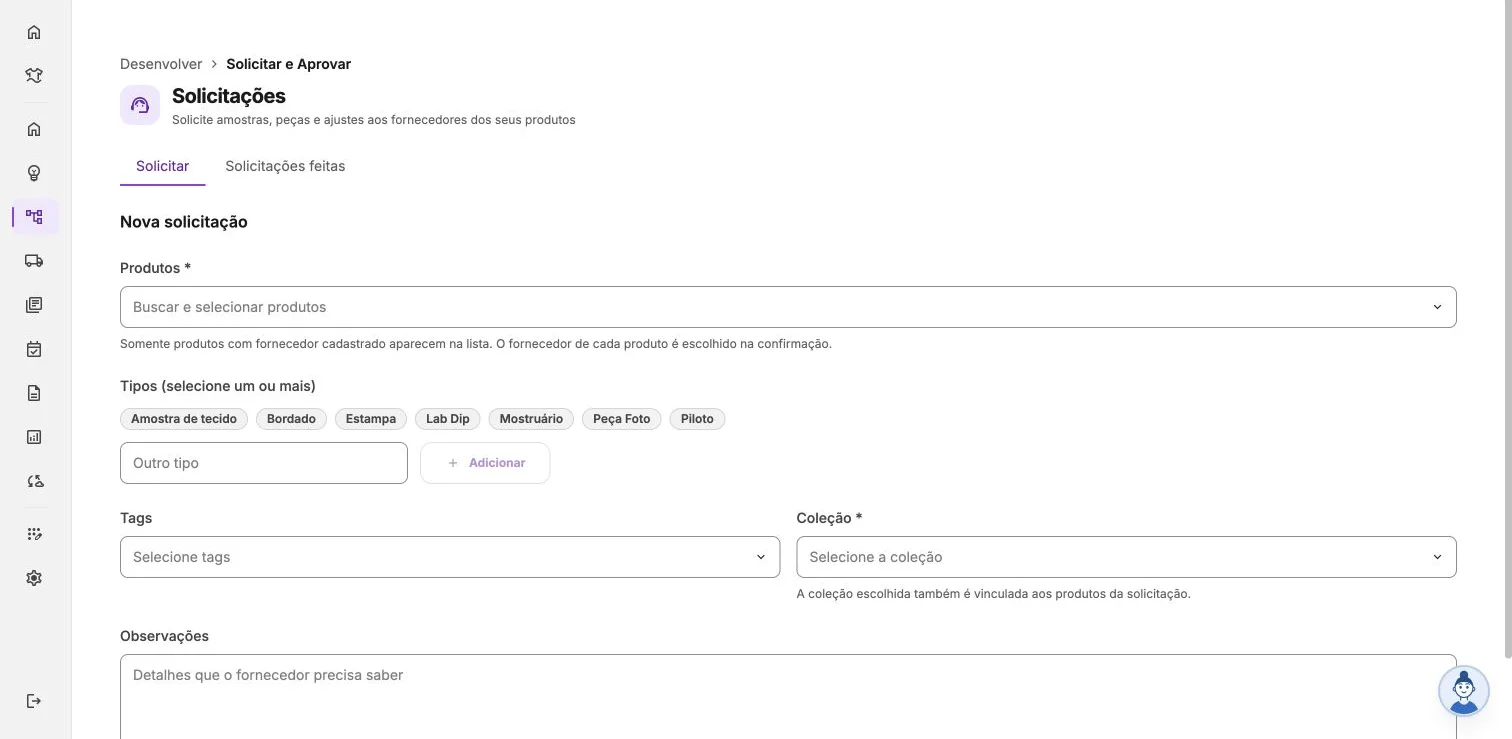
The brand opens the sample request to the supplier inside the PLM. Screenshot of uMode's PLM, demo account, 11/12/2026.
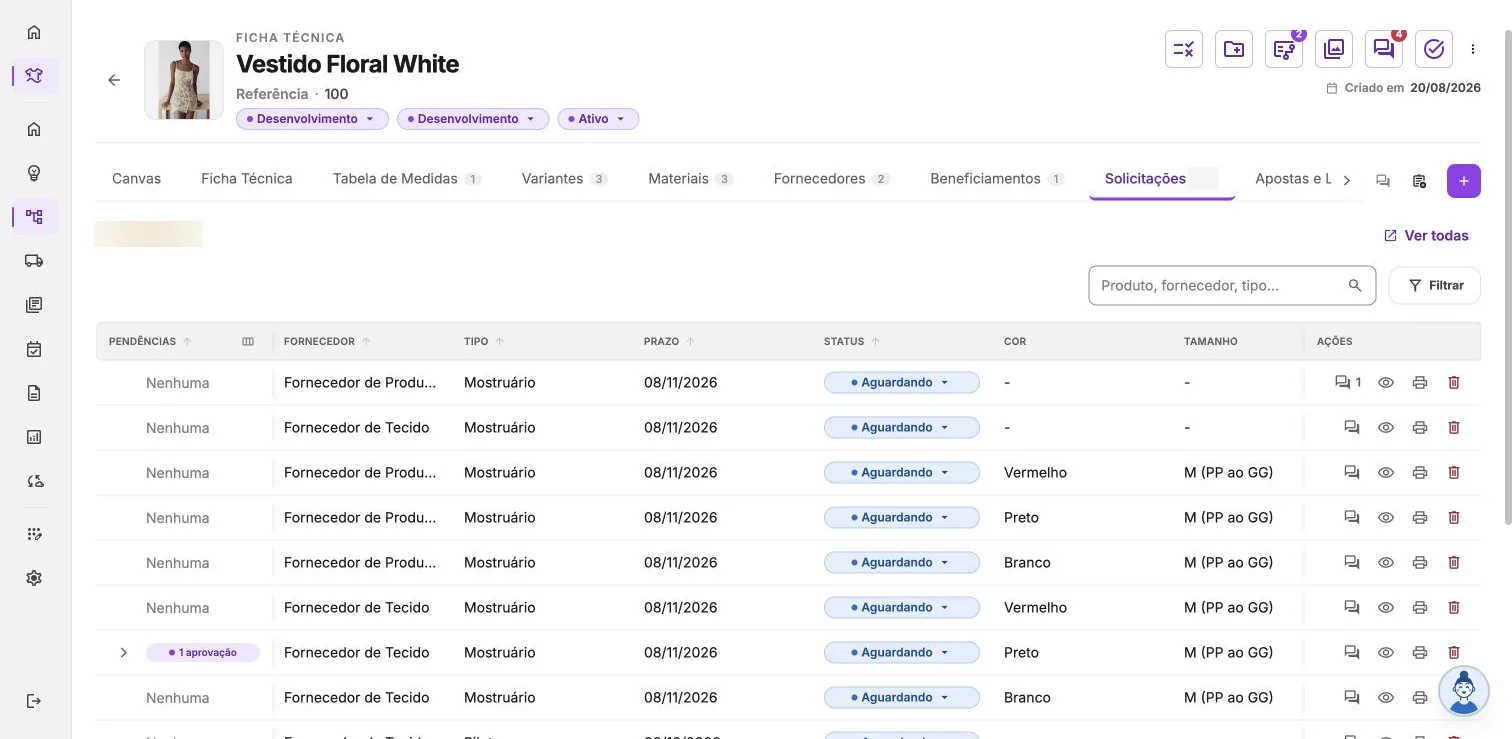
Requests to the supplier stay in the product's tech pack, with deadline and status in plain sight. Screenshot of uMode's PLM, demo account, 11/12/2026.
What changes in the routine of whoever looks after suppliers?
Imagine the Monday of someone in the role of supplier manager: three spreadsheets in the inbox, two versions of the same tech pack and a voice note saying the lab dip was approved, without saying which one. With the supplier writing in the tech pack, the morning starts with pending items and opinions, and copying spreadsheets leaves the task list.
The change calls for a few agreements before the first request:
- Decide, by product type, which fields the supplier edits and which they only read.
- Register the request types the brand uses, with their checklists.
- Agree with each supplier on who on their team will have access.
- Define who at the brand gives the opinion on each sample type.
When the supplier asks whether a measurement changed, the answer is in the field's history, with the name of who changed it and when. The conversation moves from "I sent it" against "I didn't receive it" to the record.
Frequently asked questions
Is the brand's data protected and separate from other companies' data?
Yes. Each brand is isolated on the server, and a supplier who serves more than one chooses which account they are operating in. What they see in one brand does not appear in the others.
Which tech pack fields should I open to the supplier?
Open for editing what only they know, such as consumption, process and lead time. Leave for reading what they need to follow, such as measurements and approved materials. Close what does not concern them, such as commercial data.
I don't want to open the system to the supplier. Why would I?
Because they get into their own products only and only the fields you open, and every change stays in the history with an author. The data goes in once, where it will be used.
What is a lab dip and where does it fit in a request to the supplier?
A lab dip is a color sample dyed in the lab to approve the shade before the fabric is produced. It enters as a type of sample request, with the deadline, checklist and opinion recorded in the tech pack.
The fabric consumption the supplier calculated goes into the tech pack once, with their name beside it.
Want to apply this to your operation?