Size charts and size runs in PLM: how the two meet in the tech pack
In a fashion PLM (Product Lifecycle Management), the size run defines which sizes exist and the size chart holds how much each one measures, calculated from the base size. Both live in the same tech pack. The rule that takes a measurement from one size to the next is called grading.
In an illustrative scene, you receive the pilot sample in size L, measure the bust and find the piece about two fingers bigger than it should be, because someone added the increment twice in the spreadsheet. That kind of error is born when the measurement and the size run live in different places and someone has to copy one into the other. This article shows how the two meet inside the tech pack, without repeating what the entries on the size chart and the size run already explain.
This text is part of the guide Fashion PLM: the complete guide, from tech pack to collection launch.
Why do the size chart and the size run need to be together?
Because the size run defines which sizes exist and the chart says how much each size measures, and one without the other leaves a hole. When the two are separate, every change to the size run requires revising the chart by hand, and every revision opens room for a forgotten size or a repeated calculation.
Picture the common setup. The collection's size run is in one document, the piece's chart is in a spreadsheet, and the pattern maker builds the row for each size by adding the grading in her head. When the brand decides to add XXL, the spreadsheet does not know. The spreadsheet that only one person understands keeps the L column as the last one, and the supplier receives an incomplete tech pack.
In a PLM, the size run is chosen inside the tech pack itself, and the size chart gets a column for each size of that run. The measurement and the size answer for each other: if the size run changes, the chart shows the new size waiting for a value, instead of hiding the gap.
How does the size run enter the tech pack?
The size run enters the tech pack from a single brand record, where each size run is stored with its sizes in the right order. You register the size run once and reuse it on every product that uses it.
That record holds letter size runs, such as XS to XL, and numeric ones, such as 36 to 46. The order says which size comes after which, and it is by that order that grading moves up and down from the base size. A size run out of order produces a chart that adds the increment in the wrong direction.
The mistake to avoid is creating a new size run every collection just because one detail changed. A repeated size run with a similar name confuses whoever picks it in the tech pack and spreads measurements across records that should be the same one. Before creating, search. In my experience, the size run you want often already exists under another name.
How does the size chart use the base size?
The size chart starts from a base size, marked in the tech pack, and calculates the other sizes through the grading of each measurement. You fill in the base size, define the increment for each measurement, and the rest of the size run comes out of the calculation.
The base size is the piece's mother pattern: the pattern maker gets one size right on the table and the others are born from it through grading, the way apparel pattern making has always worked. A pattern making teaching material used in federal technical education in Brazil describes the same principle: grading enlarges or reduces the base pattern following the size chart (pp. 5 and 10). The difference in PLM is that the calculation stops depending on someone's head. Grading can be in centimeters or in percentages, and each measurement keeps its own, because bust and length do not grow at the same pace.
Each measurement also carries its tolerance, the allowance accepted above or below on the finished piece. With the tolerance recorded in the tech pack, the acceptable measurement stops being an opinion at the moment of approving the piece. Without it, the review becomes a negotiation: the pattern maker says the bust is over, the supplier says their ruler reads something else, and both are partly right.
Where does the brand's measurement standard live?
The brand's measurement standard lives in a size chart library, with tolerance, grading and an image of the measuring point for each item. The tech pack pulls the chart from the library, and the standard applies to every piece that uses that chart.
Without that standard, two pattern makers measure the blouse length from different points, one from the shoulder and the other from the neckline, and both tech packs look right. The image of the measuring point in the library removes the doubt before the piece is cut.
One piece's exception and the brand's rule call for different places. If a longer sleeve applies only to that style, it is an adjustment of that tech pack. If the brand decided that all blouses in the category now have a longer sleeve, the change belongs to the standard. Mixing the two is how the standard chart piles up exceptions until nobody knows which measurement is the rule.
What does a size chart need to have in the tech pack?
A size chart in the tech pack needs the chosen size run, the marked base size and each measurement with its rule. The list below uses a fictional blouse, the Maré blouse, only as an example of the fields:
| Field | What goes in |
|---|---|
| Piece | Maré blouse, light knit |
| Size run | XS to XL, chosen from the library |
| Base size | M, marked in the tech pack and typed by hand |
| Measurement | Bust, with an image of the measuring point |
| Grading | Bust increment, in centimeters |
| Tolerance | Accepted allowance, inherited from the library |
| XS, S, L and XL | Calculated by the increment from M |
Notice the logic: only the M and the rules were typed. The S and the L came from the increment, and the bust increment was added once, by someone who does not get distracted.
How does the size chart connect to the rest of the tech pack?
The size chart connects to the rest of the tech pack because variants, materials and supplier requests use the same size run. What changes in the chart shows up for whoever works on the other parts of the tech pack, without relaying it by message.
In the materials, consumption can vary by size, so the fabric for XL follows the piece's size run instead of repeating the consumption of the M. In the sample request, the measurements travel with the opinion, and the pilot sample review compares the piece with the chart in the tech pack, instead of comparing it with a printed copy someone scribbled on the week before. For those who also decide quantity by size, the article buy by size run, color and channel shows the next step.
How uMode's PLM handles it
In uMode's PLM, the tech pack in the Desenvolver (Develop) module brings the size chart, with automatic grading from the base size, in centimeters or percentage: the whole size run is calculated from one measurement.
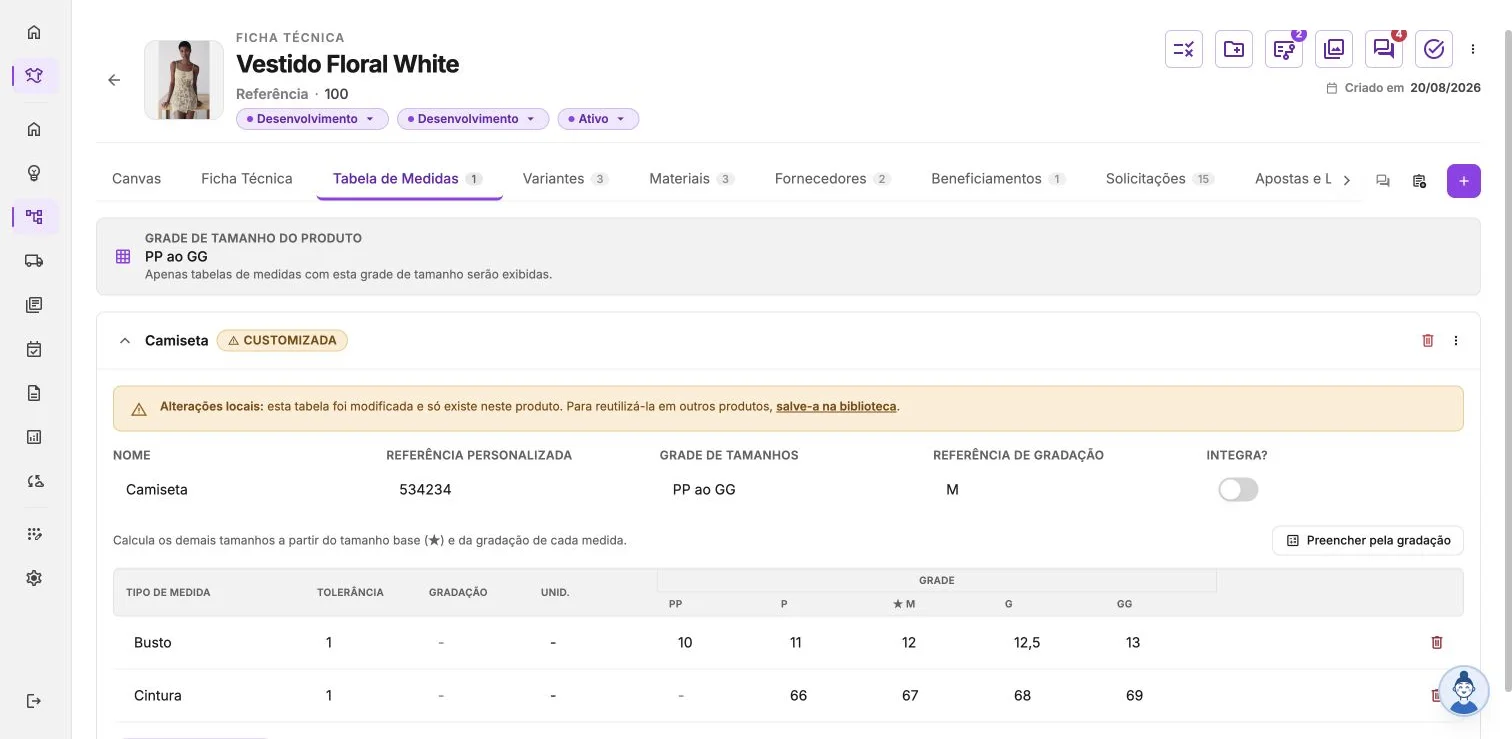
The base size stays marked and the other sizes come from the grading of each measurement. Screenshot of uMode's PLM, demo account, 11/12/2026.
In Bibliotecas (Libraries) and Cadastro de Apoio (Support Records), the Grades, tamanhos e tabelas de medidas (size runs, sizes and size charts) library holds ordered size runs and measurements with tolerance, grading and measuring point images. Size runs and charts come in through an XLSX or CSV spreadsheet import from a template, and an item that comes from the ERP stays protected.
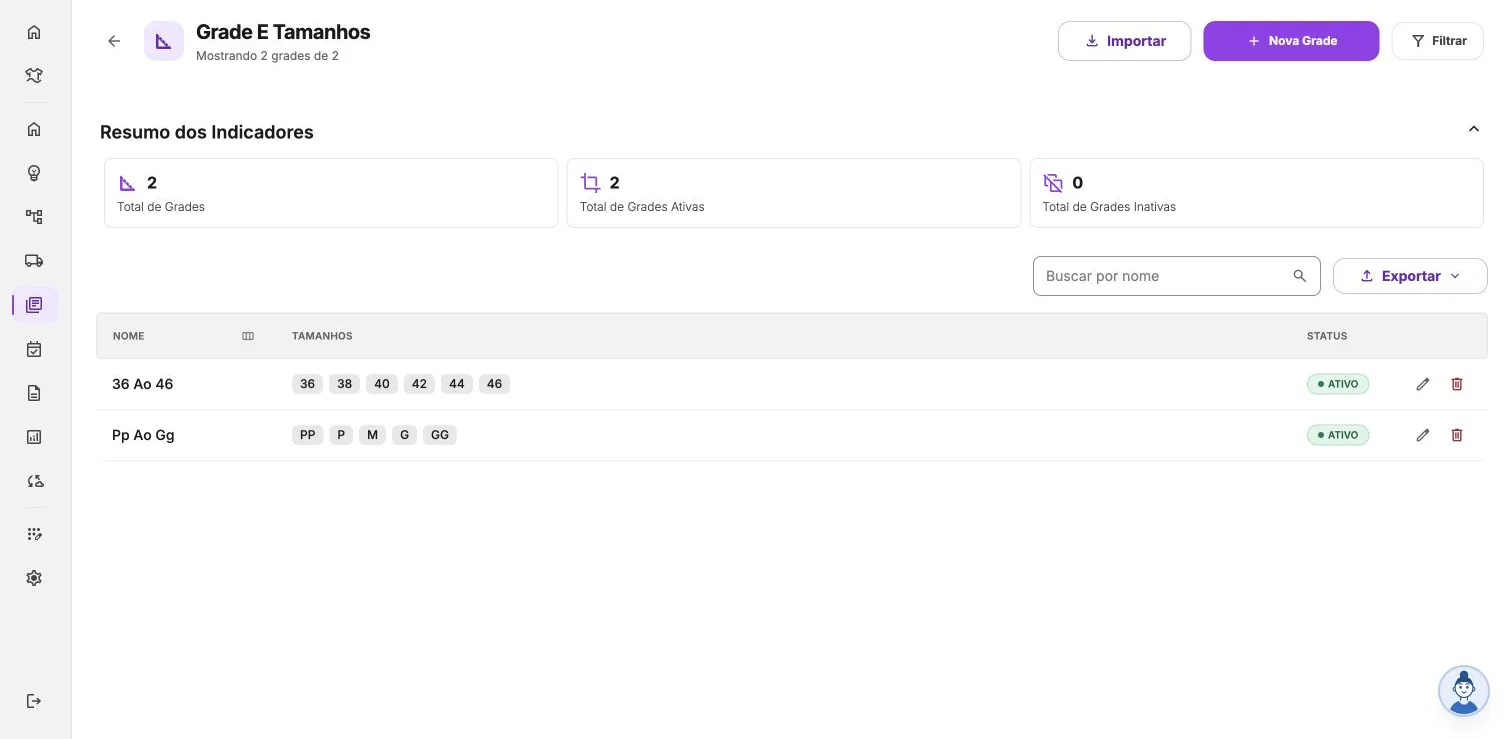
The size run is registered once in the library and then chosen in each tech pack. Screenshot of uMode's PLM, demo account, 11/12/2026.
The tech pack records history per field, with who changed what and when, and locks a tech pack, tab or field by condition or manually, with a reason and a history. Material allocation goes by variant and by size, and the sample request in Solicitar e Aprovar (Request and Approve) carries measurements and the opinion. The article on configurable base tech pack and size chart goes deeper on the setup, and the page on tech pack and development in uMode's PLM (in Portuguese) shows the whole module.
What changes in the pattern maker's routine?
With the size chart tied to the size run, the pattern maker's routine moves from repeated calculation to decision. She gets the base size and the grading rules right, and stops retyping each size on each tech pack.
The change calls for an initial decision from the brand: which size run applies to each type of product and which measuring point applies to each measurement. That decision brings design, pattern making and production together before any record is created, and puts on paper an agreement that until then only existed in people's heads. After it, the records work in the team's favor, and a new tech pack is born with the standard chart of the category.
Frequently asked questions
What is the difference between a size chart and a size run?
The size run is the ordered list of sizes in which the piece is produced, such as XS to XL. The size chart says how much each of those sizes measures, measurement by measurement.
What is the base size in grading?
The base size is the size the pattern maker gets right first and types into the chart. The other sizes in the size run come from it through grading, adding or removing the increment of each measurement.
What should I do when the size run changes after the tech pack is ready?
Swap the size run in the tech pack itself. In a PLM, the size chart gets a column for the new size, which appears waiting for a value, instead of staying hidden in a spreadsheet nobody updated.
How does the supplier know a measurement changed?
A PLM records who changed the measurement, what changed and when. The supplier with access to the tech pack always sees the current measurement, and the sample request carries the measurements along with the opinion, without an exchange of messages to confirm the version.
Can I import the size runs and charts I already have?
Generally, yes. A PLM usually accepts spreadsheet import from a template. Once imported, each size run applies to every tech pack that chooses it.
The bust of the L matches the tech pack again when the increment is added only once, and the extra two fingers stay in the old spreadsheet.
Want to apply this to your operation?