Living tech pack in PLM: from sketch to production order
A living tech pack is the fashion tech pack that is born and changes inside the PLM (Product Lifecycle Management), with a history for every field, from the sketch to the production order. Picture an illustrative scene: the fashion tech pack went to the supplier at v5, the pattern maker corrected the armhole at v7 and the pilot sample came back with the old armhole.
That mismatch happens because a static tech pack becomes a file, and files get copied. Each copy takes on a life of its own, and the right version comes to depend on who remembers where it is. The living tech pack swaps the copied file for a single record that design, pattern making, sourcing, costing and the supplier edit at the same time.
This text is part of the guide Fashion PLM: the complete guide, from tech pack to collection launch.
What changes when the tech pack becomes living?
The tech pack becomes a work desk: everyone works on the same record, and each field keeps who changed it and when. The entry on the tech pack explains what it contains.
In the usual way, the designer saves the sketch, the pattern maker opens a copy, the buyer adds the fabric in another one, and the file that goes to the supplier is called "final revised". Nobody got it wrong on purpose, but the piece was made with yesterday's information.
In the living tech pack, there is only one record. You see who is in the tech pack at that moment, each field keeps who changed it, what changed and when, and an approved stage can lock what has already been decided.
Is a living tech pack the same as a tech pack?
The living tech pack has the content of the tech pack (the technical package), kept in an editable record with history and lock. The tech pack gathers sketch, measurements, materials and construction instructions; the difference is in how it exists, because the living tech pack stays in the system, while the file package travels by email and ages in the inbox of whoever received it.
The work of structuring a tech pack still applies. In PLM, you build that structure once, as a tech pack template, and reuse it on every product.
How does the tech pack in PLM start from the sketch?
It starts in a drawing area inside the tech pack itself, where the vector sketch sits next to the data that will become production.
Front, back and construction detail sit in the same place where the pattern maker will record the measurement and the buyer will indicate the trim. In a good PLM, the drawing also keeps versions you can restore, and more than one person works on it at the same time.
How uMode's PLM handles it
In uMode's PLM, the tech pack lives in the Desenvolver (Develop) module, and the sketch sits in the Canvas, a tab of the tech pack itself with collaborative vector drawing in real time and restorable versions. When creation starts earlier, in the Criar (Create) module, the images arrive in the tech pack's Galeria (Gallery) and continue from there.
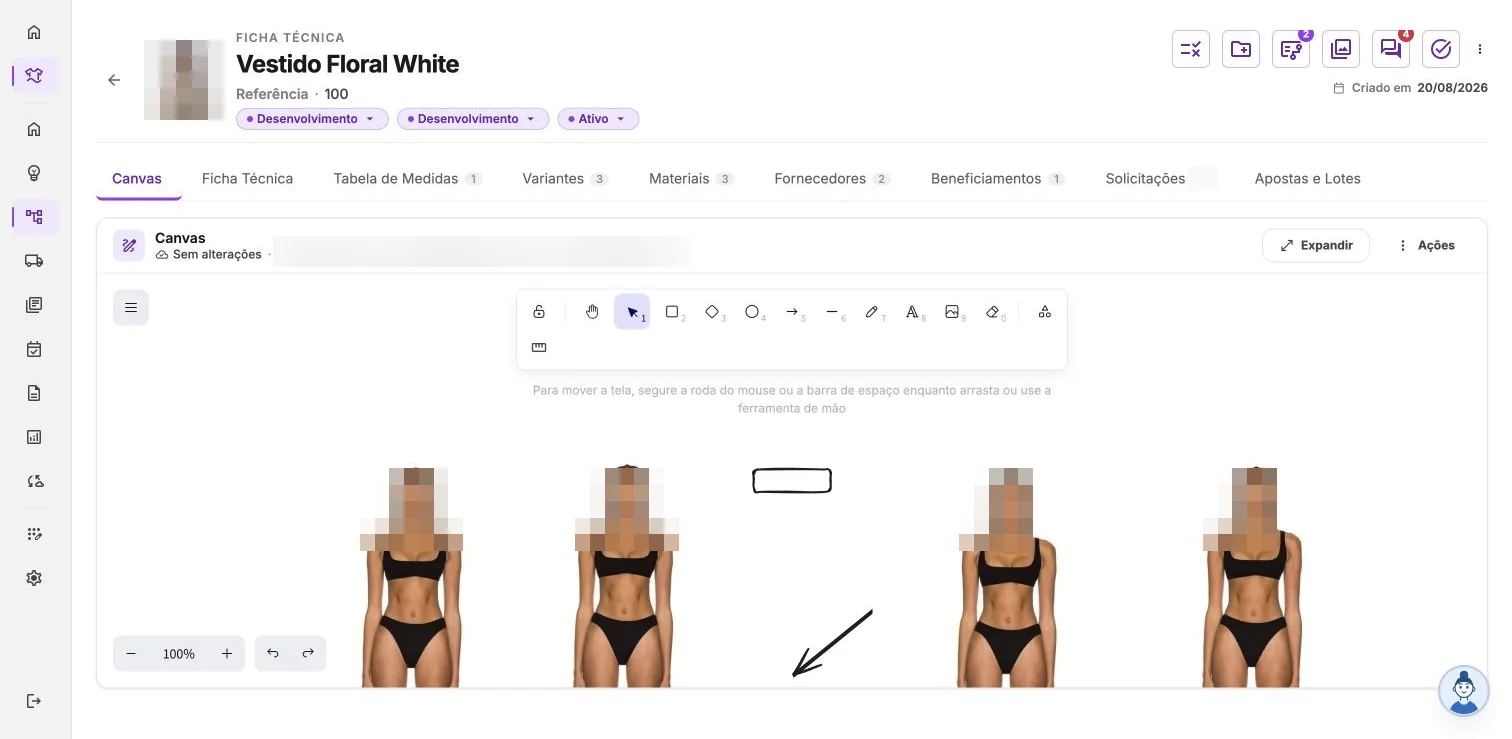
Vector drawing inside the tech pack, next to the tabs for measurements, materials and requests. Screenshot of uMode's PLM, demo account, 11/12/2026.
Who defines the fields the tech pack has?
The brand itself defines them, without a programmer, in a tech pack template builder. In it you assemble tabs, sections and fields of several types, such as text, selection, date, file and formula, and choose rules to show, hide, make read-only or require.
Leaving a free text field for everything creates a problem that only shows up later. The designer writes "navy blue", the buyer types "navy" and the supplier sends back "nvy blue". At the end of the collection, the color report shows three shades where there is only one.
The way out is to tie each field of the tech pack to a master record. The master record holds colors, materials, suppliers and size runs; the rules say which record each field points to, which lists depend on others and what is required. The record says what, and the rules say how.
How uMode's PLM handles it
In uMode's PLM, the tech pack template is built in the Construtor de Fichas Base (Base Tech Pack Builder), in Configurações (Settings). The master record lives in the Bibliotecas (Libraries), and the rules live in Cadastro de Apoio (Support Records), which ties each field to a library, defines cascading lists and marks what is required.
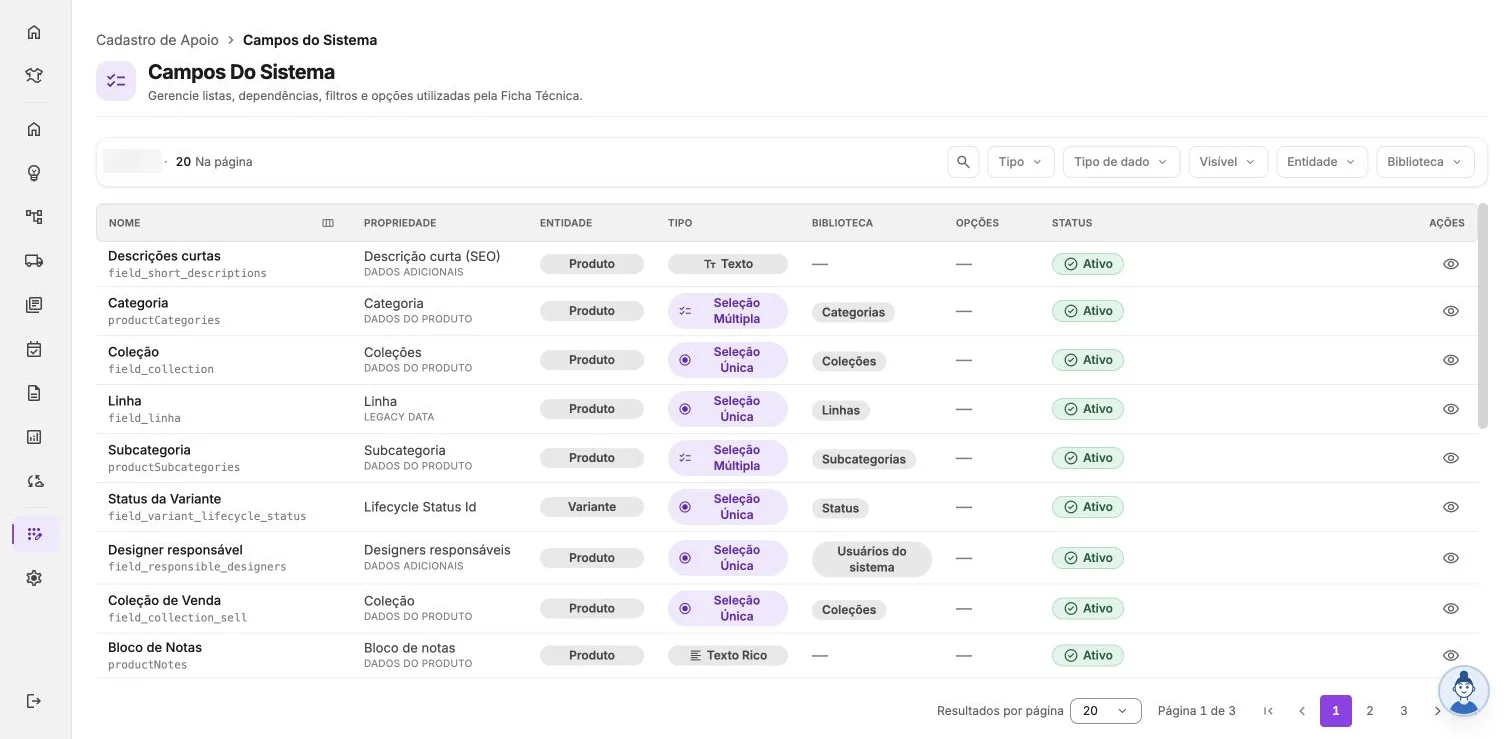
Each tech pack field points to a library and has a defined type, which prevents the same color from being written in different ways. Screenshot of uMode's PLM, demo account, 11/12/2026.
How do materials and trims enter the tech pack?
They come in pulled from the master record, with the consumption and the place of application of each item. You choose the fabric and the trim from the list, instead of typing the name, and say where each one goes on the piece.
Think of the lining that changes with the color of the dress. The material allocation can vary by variant and by size. With the pre-cost in the tech pack itself, that difference shows up in the cost while the product is still in development, before approval. The logic is that of the bill of materials, with the trims recorded at the exact point where they are applied.
How uMode's PLM handles it
In Desenvolver (Develop), the Materiais (Materials) tab pulls fabrics and trims from the Bibliotecas (Libraries), with allocation by variant and by size, material packages and place of application. The pre-cost sits in the same tech pack.
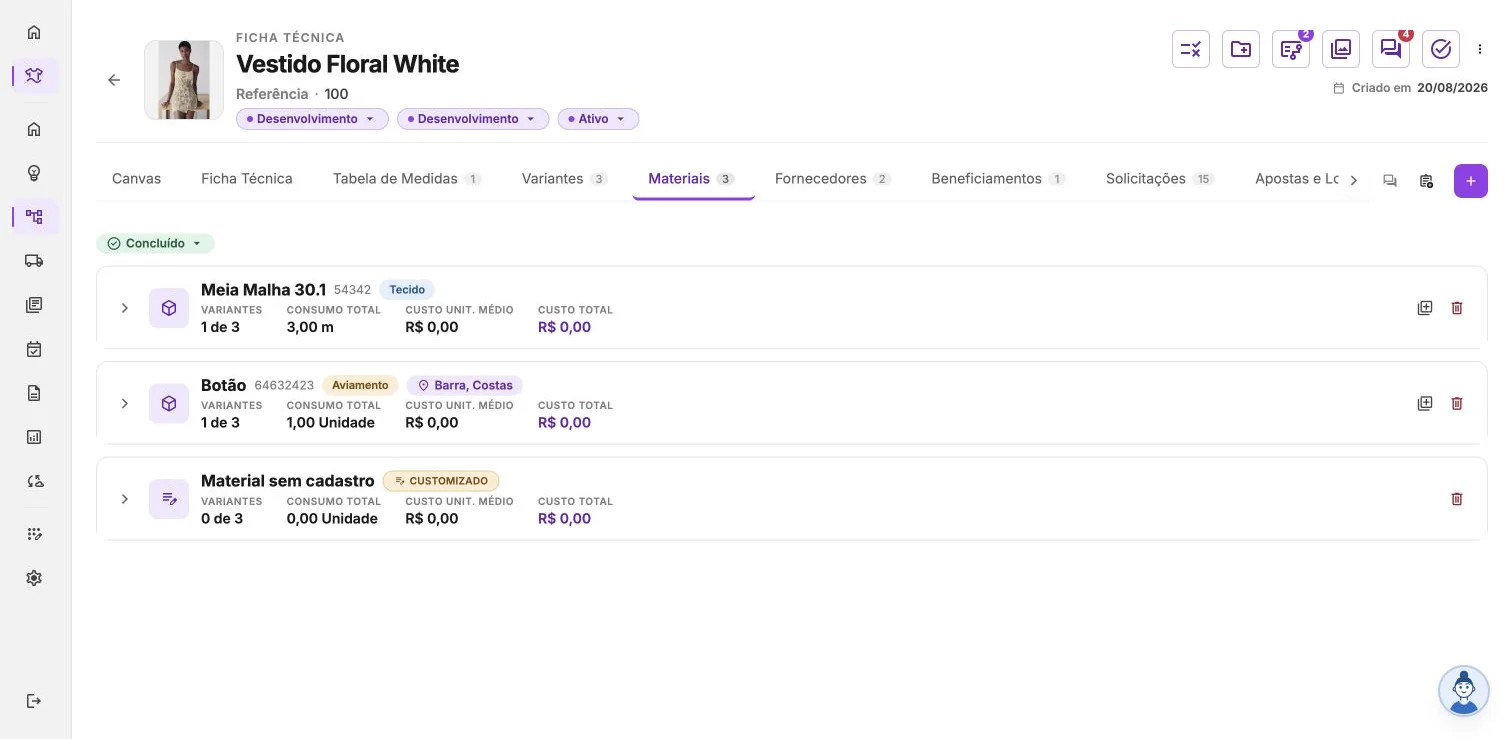
Fabric and trims come from the library and each item shows where it goes on the piece. Screenshot of uMode's PLM, demo account, 11/12/2026.
How do you control versions without losing the right one?
You control versions through the trail of each field and through edit locks, instead of saving numbered copies. The entry on tech pack version control covers the subject in general; here the focus is what the living tech pack changes in it.
Go back to the armhole in the opening scene. In the static file, v7 existed, but nobody knew whether it was the one that went to the supplier. In the living tech pack, the armhole is a field, and the field itself answers who touched the measurement and on what day.
Edit locks close what has already been approved. You can lock the whole tech pack, a tab or a field, by condition or manually, with a reason and a history. The lock works like the seal on the approved sample: the piece is still there, and any touch is recorded in plain sight.
How uMode's PLM handles it
In Desenvolver (Develop), the Travas de edição (Edit Locks) block a tech pack, tab or field by condition or manually, with a reason and a history. The Lixeira (Trash) restores a deleted product and lets you choose which variants come back.
Example of a fashion tech pack filled in inside PLM
A filled-in living tech pack has each piece of information in the right field and with a clear owner. The table below shows a fictional piece, the Brisa dress, only as an example:
| Field | Value | Who fills it in |
|---|---|---|
| Style number | Brisa dress, summer collection | Design |
| Sketch | Front, back and strap detail inside the tech pack | Design |
| Measurements | Chart tied to the size run of the piece | Pattern making |
| Main fabric | Printed viscose, chosen from the master record | Sourcing |
| Trim | Invisible zipper, applied at the back | Sourcing |
| Pre-cost | Calculated from the allocation by size | Costing |
| Supplier | Linked to the tech pack, seeing only the fields the brand opens | Supplier |
| History | Armhole changed, with the name and time of who changed it | Automatic record |
| Lock | Materials locked after pilot approval | Development |
No line depends on an attachment. If the strap color changes, the change stays in the variant's field, with name and time, and the next printout already pulls the updated field.
How does the tech pack reach the production order?
It arrives through a flow of stages with entry and exit requirements and through a print template that generates the final document. A stage only advances when what it requires is filled in.
Each stage can trigger automations, such as a task, an approval, a calculation or an email notice, and the deadline of each one fits inside the collection window. The print template can carry conditional rules and come out filtered by supplier, with only what concerns them.
This is where the opening scene closes. The armhole corrected at v7 went through pilot approval, and the pattern making tab was locked. When the production order goes out, the printout filtered for that supplier pulls the v7 measurement, because there is no other copy to pull from.
The ERP keeps the final tech pack; PLM is where it is built with every area, and the integration delivers it ready to the ERP. The subject has its own article: PLM and ERP integration without retyping.
How uMode's PLM handles it
In uMode's PLM, the tech pack moves through the Workflows of Desenvolver (Develop), with requirements and a deadline per stage, and comes out through the Construtor de impressão (Print Builder), with saved templates, QR code and conditional rules. Integração (Integration) delivers the finished tech pack to the ERP. See how this works in practice in tech pack and development in uMode's PLM (in Portuguese).
Where does AI come in on the living tech pack?
AI shows up along the tech pack as support for the team, and, in my view, the decision about the piece should stay with whoever answers for it. Think of the fitting opinion: the pattern maker comments out loud on the drape, the shoulder, the hem, and that comment is usually lost in a phone voice note. When the spoken opinion becomes text inside the tech pack, the next person reads what was said, without depending on who was in the room.
How uMode's PLM handles it
In Desenvolver (Develop), AI is present at every stage of the tech pack. It translates the tech pack field by field, helps with pattern adjustments and transcribes the audio of whoever comments on a sample approval, so the spoken opinion becomes text in the tech pack.
Frequently asked questions
We already have the tech pack in the ERP. Why build it in PLM?
Because the ERP receives the closed tech pack, and the path to it goes unrecorded. In PLM stay the sketch, the versions, the approvals and the conversation with the supplier, with a history for every field, before the tech pack moves on ready.
Does PLM cover the industrial side, such as bill of materials and costing?
It covers the part that starts in the tech pack: materials and trims with consumption by variant and by size, finishing processes with place of application and a pre-cost from the start of development. The ERP receives the final tech pack ready.
Who approves what AI suggests in the tech pack?
The person responsible for the stage. AI translates the tech pack field by field, helps with pattern adjustments and transcribes the audio of sample approvals, so the opinion becomes recorded text. Whoever decides about the piece is whoever answers for it.
The team will resist leaving the spreadsheet. What then?
A PLM with a spreadsheet mode, pasting straight from the spreadsheet and bulk editing lets people who think in rows and columns work the same way, only on the single record of the tech pack, with the trail and the seal a spreadsheet does not have.
The right tech pack is the one that shows who changed the armhole, when and why.
Want to apply this to your operation?