Sample, lab dip and pilot: request everything from your supplier without leaving the platform
A sample request is the formal order a brand places with its supplier to receive a piece, a color test or an application detail before approving production. The request usually goes out from three places at once: a voice message to the representative, a tracking spreadsheet and an email with the note that was left out of the spreadsheet.
The following week, the supplier delivers the pilot without the agreed embroidery, the product team swears they warned about it, and the conversation turns into a reconstruction of messages. The sample is late, and the collection deadline slips with it.
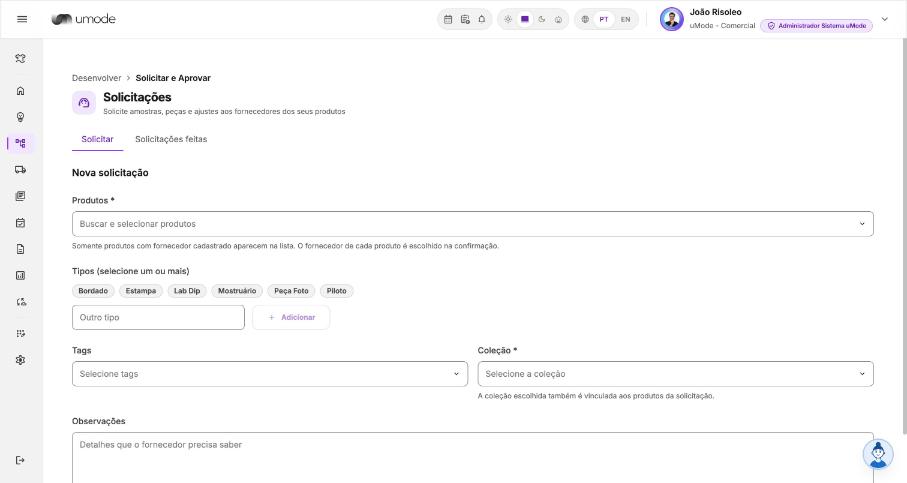
On the uMode platform, the request is born on a single screen, with the products, the sample type and the note together.
What can you request?
In Desenvolver (Develop), the Solicitar e Aprovar (Request and Approve) module has the Solicitações (Requests) page, built to request samples, pieces and adjustments from the suppliers of your products. It has two tabs: Solicitar (Request), to open a new request, and Solicitações feitas (Requests made), where everything already requested is kept.
The types come as options that can be combined in the same request:
| Type | Generally used for |
|---|---|
| Lab dip | Testing the color on the fabric before dyeing the batch |
| Checking the print application | |
| Embroidery | Checking the embroidery on the piece |
| Showroom sample | Requesting pieces for the showroom and sales |
| Photo piece | Receiving the piece for the image shoot |
| Pilot | Validating the piece before production |
If your case is not on the list, the "Other type" field lets you create a new one and add it to the request.
How is the request built?
You search for and select one or more products. The list shows only products with a registered supplier, and each product's supplier is chosen at confirmation, which prevents a request without a recipient. Then you check the types, choose tags, set the collection and write the notes, the space for the details the supplier needs to know.
The collection is required, and the one chosen is also linked to the products in the request. The request arrives already organized by collection, and whoever follows the schedule knows which collection each sample belongs to.
The screen design closes three common gaps. A product without a registered supplier does not appear in the list, so the request is not created without a recipient. The collection is required, so the request is not created loose. And the note has its own field, so the detail that used to live in the voice message now lives in the same record as the request.
What changes for the product team?
Each request stops depending on memory. The type, the collection and the note stay in the same record, and the history of requests made is one tab away. The supplier receives a complete request, and the product team stops being the living archive of conversations.
Anyone who wants to understand what gets checked when the piece arrives will find, in the Fashionpedia entry on sample approval, the process of comparing the sample with the specification and recording the discrepancies.
A well-written request is the first step of approval.
Want to apply this to your operation?