From inspiration board to product with technical drawing, without starting over
An inspiration board is the canvas where the style team gathers a collection's references and chooses what deserves to become a piece. The problem shows up on the Tuesday after approval: the designer marked the pieces on the board, development opens a blank spreadsheet and nobody can say which reference gave rise to which tech pack.
The scene repeats in almost every brand. The reference lives in a presentation, the product is born in another system and the technical drawing arrives by email. When the board asks why that shirt exists, the answer depends on the memory of whoever was in the room.
On the uMode platform, the board and the product are part of the same path.
Where does the board live?
Inside the Área de criação (Creation area), the boards gallery gathers all the account's boards, each with the number of products already linked to it and the date of the last update. You can search by name or open a new board in one click.
When you open a board, you choose how to work: on a free canvas, where you drag, group and write over it, or in Kanban view. The top bar shows what comes after inspiration, with the buttons Produto (Product), Sortimento (Assortment), Aprovações (Approvals) and Mapa de Aprovados (Approved Map), plus Filters, Print, Images and Bulk edit. The board is born with the next step in view.
How does the reference become a product?
From an image on the board, you create the product. The piece created stays linked to the source image, and the question "where did this come from?" has an answer on the screen itself, with no file hunting.
What does the Map show?
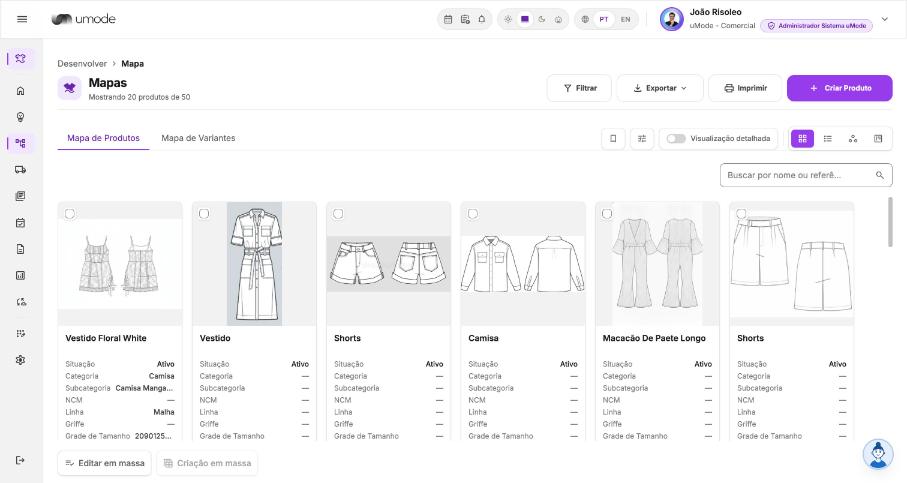
In Desenvolver (Develop), the Mapa (Map) gathers products in cards with the piece's technical drawing, front and back, and the data the team consults all the time.
| Field on the card | What it is for |
|---|---|
| Status | Saying whether the product is active |
| Category and subcategory | Organizing the collection by piece type |
| NCM | Keeping the tax code (Brazilian NCM) with the tech pack |
| Line and label | Identifying the piece's line and label |
| Size run | Linking the piece to the size run it uses |
The Map has two tabs, Mapa de Produtos (Product Map) and Mapa de Variantes (Variant Map), and switches between view modes, such as cards and list. There is search by name or reference, filters, export, printing and bulk editing, plus bulk creation when the team needs to register many pieces at once. The Criar Produto (Create Product) button sits at the top, within reach of whoever has just approved an idea.
What changes for the team?
The designer stops handing over a folder and starts handing over a product. Development receives the piece with category, line and size run already filled in and with the technical drawing alongside, instead of building everything again. Management sees the whole collection on one screen, with the boards linked to the products born from them.
Anyone who wants the concept behind the first step will find, in the Fashionpedia entry on the fashion moodboard, what makes a board work and where it usually fails.
A beautiful reference only becomes a collection when it reaches the product with the technical drawing alongside.
Want to apply this to your operation?