Development workflow: stages, collections and deadlines in one flow
A development workflow is the design of the stages each product goes through, from the first idea to release for production, with a deadline and an owner at each one. The problem appears when it lives in the heads of two people: pattern making thinks the piece is at the fitting, design thinks it is at approval, and the collection date arrives with nobody knowing where each product stopped.
On Monday the product analyst opens the tracking spreadsheet and finds three versions of it, each with a different cell color. The status meeting spends half an hour just figuring out which one is the real one.
On the uMode platform, the process becomes a flow configured once and followed by everyone on the same screen.
Where is the flow configured?
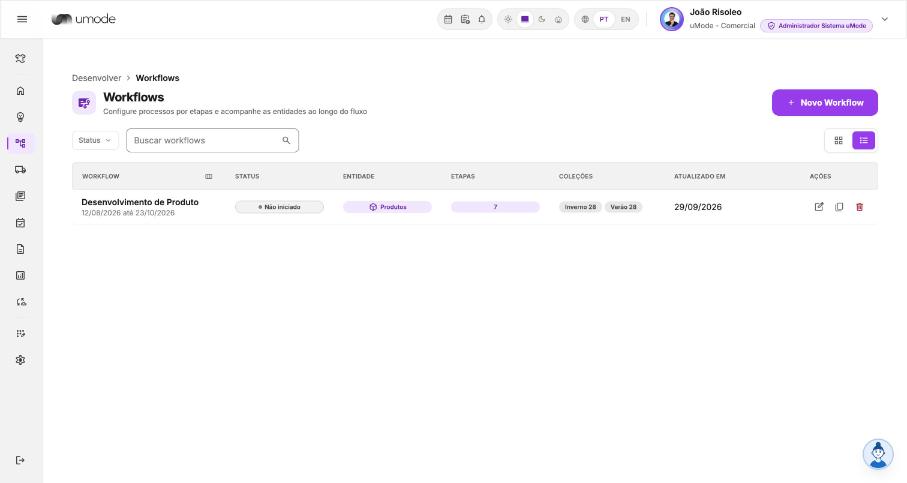
Inside Desenvolver (Develop), the Workflows module has a sentence that sums up the idea: configure processes by stages and track entities along the flow. The list shows each workflow on a row, with what the team needs to get oriented:
| Column | What it shows |
|---|---|
| Workflow and period | The process name and the start and end dates |
| Status | Where the flow stands, such as Not started |
| Entity | What moves through the flow, here Products |
| Stages | How many stages the process has |
| Collections | The collections that use this flow |
| Updated on | The date of the last change |
In the screen example, the Product Development workflow runs from August 12 to October 23, 2026, has seven stages and serves two collections at the same time, Winter 28 and Summer 28. Each row has edit, duplicate and delete actions, and a New Workflow button opens the next process. You can switch between card view and list view, filter by status and search by name.
What changes when the process becomes a flow?
The first change is clarity of stage. Instead of each person carrying their own version of the process, the whole team sees the same seven stages in the same order. When someone asks where the piece is, the answer points to a stage in the flow.
The second is the deadline in the same place as the work. The workflow's period and the collections linked to it stay together, and the collection date stops being a notice on the wall and becomes part of the process design.
The third is reuse. Because the flow can be duplicated, the design that worked in one season serves as the starting point for the next, and the team adjusts what changed instead of starting from scratch.
The fourth is the view from above. Whoever coordinates several collections sees, in a short list, which flows are about to start, which are in progress and when each was last updated.
The same account also includes Minha Mesa (My Desk), with tasks and calendar, Checklists and Cronograma (Schedule), so the flow lives alongside the team's daily routine. To understand how the collection calendar is organized behind this, with milestones, dependencies and decision windows, the Fashionpedia entry on the collection calendar explains the concept.
A deadline everyone can see is a deadline the team can meet.
Want to apply this to your operation?