Configurable base tech pack and assortment by collection plan
A base tech pack is the structural template that defines which fields, blocks and information every tech pack of a given product type must have. Without it, each designer builds their own: one tech pack has the measurement table, another forgets it, and pattern making discovers the difference when the piece arrives at the fitting.
The product coordinator needs one tech pack for apparel and another for footwear, but what exists is a folder with twenty files, each with its own logic. When it is time to plan the collection, nobody is sure which tech packs have already been made or which are still missing.
On the uMode platform, the tech pack becomes a configurable template and the collection gets a plan.
Where is the tech pack template built?
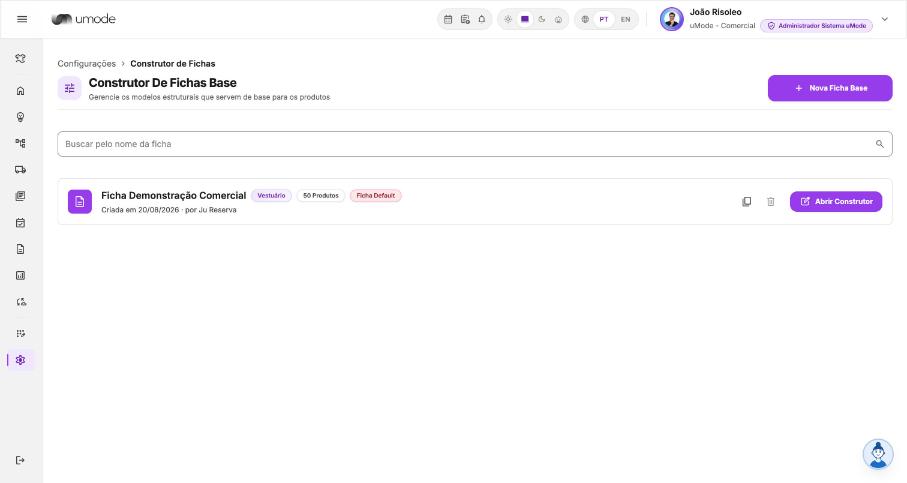
In Configurações (Settings), the Construtor de Fichas Base (Base Tech Pack Builder) gathers the structural templates that serve as the base for products. The screen lists each tech pack with what matters for choosing: the name, the segment, how many products use the template and the default tech pack marker. You can search by name, duplicate an existing template and open the builder to edit the structure.
In the screen example, the apparel tech pack appears as the default and is already used by 50 products. The default marker indicates which template the team uses by rule, and the team fills in the content instead of designing the tech pack.
Measurements and sizes have their own place on the platform, in the Tabela de Medidas (Measurement Table) and Grade e Tamanhos (Size Run and Sizes) libraries, next to those for Colors, Materials and Compositions. With everything registered in libraries and the tech pack structure defined in a template, checking no longer depends on the memory of whoever built the tech pack.
How does assortment organize the collection?
In Criar (Create), the Sortimento (Assortment) module stores the collection plans. Each plan is a card with a name, status and last-updated date, and a Novo Plano (New Plan) button opens the next one.
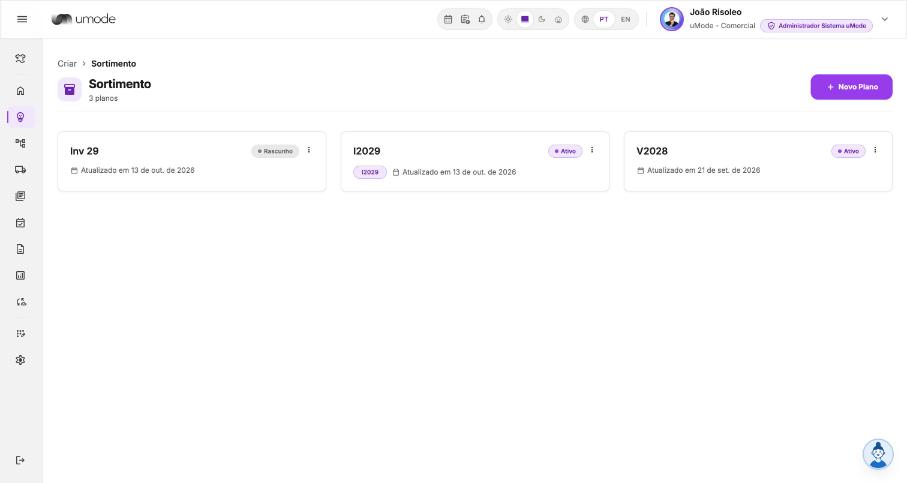
On the example screen, the account has three plans: one draft and two active, and one of them carries the label of the collection it belongs to. The status separates what is still being thought through from what the team is already using, and each plan shows when it was last touched.
What changes for the product team?
The order of work changes. The collection plan is born in Assortment, and the tech pack structure comes from a base template defined before the products.
Standardization changes. When there is a single template, every apparel tech pack follows the same structure, and comparing products no longer depends on who filled it in.
Rework changes too. If the structure needs to change, the team works on the template, which can be duplicated and adjusted, instead of building a new tech pack from scratch for each product.
To understand what makes a well-made tech pack, with its blocks and the function of each, the Fashionpedia entry on the fashion product tech pack covers the concept.
A tech pack standardized at the source saves checking at the end.
Want to apply this to your operation?